JavaScript is a scripting language. It is different from Java language. It is object-based, lightweight, cross-platform translated language. It is widely used for client-side validation. The JavaScript Translator (embedded in the browser) is responsible for translating the JavaScript code for the web browser. More details.
2) List some features of JavaScript.
Some of the features of JavaScript are:
Lightweight
Interpreted programming language
Good for the applications which are network-centric
Complementary to Java
Complementary to HTML
Open source
Cross-platform
3) Who developed JavaScript, and what was the first name of JavaScript?
JavaScript was developed by Brendan Eich, who was a Netscape programmer. Brendan Eich developed this new scripting language in just ten days in the year September 1995. At the time of its launch, JavaScript was initially called Mocha. After that, it was called Live Script and later known as JavaScript.
34.2M
622
History of Java
4) List some of the advantages of JavaScript.
Some of the advantages of JavaScript are:
Server interaction is less
Feedback to the visitors is immediate
Interactivity is high
Interfaces are richer
5) List some of the disadvantages of JavaScript.
Some of the disadvantages of JavaScript are:
No support for multithreading
No support for multiprocessing
Reading and writing of files is not allowed
No support for networking applications.
6) Define a named function in JavaScript.
The function which has named at the time of definition is called a named function. For example
function msg()
{
document.writeln(“Named Function”);
}
msg();
7) Name the types of functions
The types of function are:
Named – These type of functions contains name at the time of definition. For Example:
function display()
{
document.writeln(“Named Function”);
}
display();
Anonymous – These type of functions doesn’t contain any name. They are declared dynamically at runtime.
var display=function()
{
document.writeln(“Anonymous Function”);
}
display();
8) Define anonymous function
It is a function that has no name. These functions are declared dynamically at runtime using the function operator instead of the function declaration. The function operator is more flexible than a function declaration. It can be easily used in the place of an expression. For example:
var display=function()
{
alert(“Anonymous Function is invoked”);
}
display();
9) Can an anonymous function be assigned to a variable?
Yes, you can assign an anonymous function to a variable.
10) In JavaScript what is an argument object?
The variables of JavaScript represent the arguments that are passed to a function.
11) Define closure.
In JavaScript, we need closures when a variable which is defined outside the scope in reference is accessed from some inner scope.
var num = 10;
function sum()
{
document.writeln(num+num);
}
sum();
12) If we want to return the character from a specific index which method is used?
The JavaScript string charAt() method is used to find out a char value present at the specified index. The index number starts from 0 and goes to n-1, where n is the length of the string. The index value can’t be a negative, greater than or equal to the length of the string. For example:
var str=“Javatpoint”;
document.writeln(str.charAt(4));
13) What is the difference between JavaScript and JScript?
Netscape provided the JavaScript language. Microsoft changed the name and called it JScript to avoid the trademark issue. In other words, you can say JScript is the same as JavaScript, but Microsoft provides it.
14) How to write a hello world example of JavaScript?
A simple example of JavaScript hello world is given below. You need to place it inside the body tag of HTML.
15) What are the key differences between Java and JavaScript? / How is JavaScript different from Java?
JavaScript is a lightweight programming language (most commonly known as scripting language) developed by Netscape, Inc. It is used to make web pages interactive. It is not a part of the Java platform. Following is a list of some key differences between Java and JavaScript
A list of key differences between Java and JavaScript
Java
JavaScript
Java is a complete and strongly typed programming language used for backend coding. In Java, variables must be declared first to use in the program, and the type of a variable is checked at compile-time.
JavaScript is a weakly typed, lightweight programming language (most commonly known as scripting language) and has more relaxed syntax and rules.
Java is an object-oriented programming (OOPS) language or structured programming languages such as C, C++, or .Net.
JavaScript is a client-side scripting language, and it doesn’t fully support the OOPS concept. It resides inside the HTML documents and is used to make web pages interactive (not achievable with simple HTML).
Java creates applications that can run in any virtual machine (JVM) or browser.
JavaScript code can run only in the browser, but it can now run on the server via Node.js.
The Java code needs to be compiled.
The JavaScript code doesn’t require to be complied.
Java Objects are class-based. You can’t make any program in Java without creating a class.
JavaScript Objects are prototype-based.
Java is a Complete and Standalone language that can be used in backend coding.
JavaScript is assigned within a web page and integrates with its HTML content.
Java programs consume more memory.
JavaScript code is used in HTML web pages and requires less memory.
The file extension of the Java program is written as “.Java” and it translates source code into bytecodes which are then executed by JVM (Java Virtual Machine).
The JavaScript file extension is written as “.js” and it is interpreted but not compiled. Every browser has a JavaScript interpreter to execute the JS code.
Java supports multithreading.
JavaScript doesn’t support multithreading.
Java uses a thread-based approach to concurrency.
JavaScript uses an event-based approach to concurrency.
16) How to use external JavaScript file?
I am assuming that js file name is message.js, place the following script tag inside the head tag.
Yes, JavaScript is a case sensitive language. For example:
Var msg = “JavaScript is a case-sensitive language”; //Here, var should be used to declare a variable
function display()
{
document.writeln(msg); // It will not display the result.
}
display();
18) What is BOM?
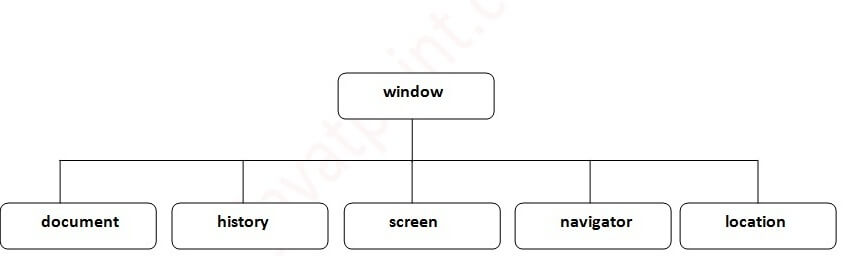
BOM stands for Browser Object Model. It provides interaction with the browser. The default object of a browser is a window. So, you can call all the functions of the window by specifying the window or directly. The window object provides various properties like document, history, screen, navigator, location, innerHeight, innerWidth,
The window object is created automatically by the browser that represents a window of a browser. It is not an object of JavaScript. It is a browser object.
The window object is used to display the popup dialog box. Let’s see with description.
Method
Description
alert()
displays the alert box containing the message with ok button.
confirm()
displays the confirm dialog box containing the message with ok and cancel button.
prompt()
displays a dialog box to get input from the user.
open()
opens the new window.
close()
closes the current window.
setTimeout()
performs the action after specified time like calling function, evaluating expressions.
The history object of a browser can be used to switch to history pages such as back and forward from the current page or another page. There are three methods of history object.
history.back() – It loads the previous page.
history.forward() – It loads the next page.
history.go(number) – The number may be positive for forward, negative for backward. It loads the given page number.
24) What are the different data types present in JavaScript?
There are two types of data types in JavaScript:
Primitive data types
Non- Primitive data types
Primitive data types
The primitive data types are as follows:
String: The string data type represents a sequence of characters. It is written within quotes and can be represented using a single or a double quote.
Example:
var str1 = “Hello JavaTpoint”; //using double quotes
var str2 = ‘Hello Javatpoint’; //using single quotes
Number: The number data type is used to represent numeric values and can be written with or without decimals.
Example:
var x = 5; //without decimal
var y = 5.0; //with decimal
Boolean: The Boolean data type is used to represent a Boolean value, either false or true. This data type is generally used for conditional testing.
Example:
var x = 5;
var y = 6;
var z = 5;
(x == y) // returns false
(x == z) //returns true
BigInt: The BigInt data type is used to store numbers beyond the Number data type limitation. This data type can store large integers and is represented by adding “n” to an integer literal.
Example:
var bigInteger = 123456789012345678901234567890;
// This is an example of bigInteger.
Undefined: The Undefined data type is used when a variable is declared but not assigned. The value of this data type is undefined, and its type is also undefined.
Example:
var x; // value of x is undefined
var y = undefined; // You can also set the value of a variable as undefined.
Null: The Null data type is used to represent a non-existent, null, or a invalid value i.e. no value at all.
Example:
var x = null;
Symbol: Symbol is a new data type introduced in the ES6 version of JavaScript. It is used to store an anonymous and unique value.
Example:
var symbol1 = Symbol(‘symbol’);
typeof: The typeof operator is used to determine what type of data a variable or operand contains. It can be used with or without parentheses (typeof(x) or typeof x). This is mainly used in situations when you need to process the values of different types.
Example:
typeof 10; // Returns: “number”
typeof 10.0; // Returns: “number”
typeof 2.5e-4; // Returns: “number”
typeof Infinity; // Returns: “number”
typeof NaN; // Returns: “number”. Despite being “Not-A-Number”
// Strings
typeof ”; // Returns: “string”
typeof ‘Welcome to JavaTpoint’; // Returns: “string”
typeof ’12’; // Returns: “string”. Number within quotes is typeof string
In the above examples, we can see that the primitive data types can store only a single value. To store multiple and complex values, we have to use non-primitive data types.
The non-primitive data types are as follows:
Object: The Object is a non-primitive data type. It is used to store collections of data. An object contains properties, defined as a key-value pair. A property key (name) is always a string, but the value can be any data type, such as strings, numbers, Booleans, or complex data types like arrays, functions, and other objects.
Example:
// Collection of data in key-value pairs
var obj1 = {
x: 123,
y: “Welcome to JavaTpoint”,
z: function(){
return this.x;
}
}
Array: The Array data type is used to represent a group of similar values. Every value in an array has a numeric position, called its index, and it may contain data of any data type-numbers, strings, Booleans, functions, objects, and even other arrays. The array index starts from 0 so that the first array element is arr[0], not arr[1].
Example:
var colors = [“Red”, “Yellow”, “Green”, “Orange”];
The isNan() function returns true if the variable value is not a number. For example:
function number(num) {
if (isNaN(num)) {
return “Not a Number”;
}
return “Number”;
}
console.log(number(‘1000F’));
// expected output: “Not a Number”
console.log(number(‘1000’));
// expected output: “Number”
31) What is the output of 10+20+”30″ in JavaScript?
3030 because 10+20 will be 30. If there is numeric value before and after +, it treats as binary + (arithmetic operator).
function display()
{
document.writeln(10+20+”30″);
}
display();
32) What is the output of “10”+20+30 in JavaScript?
102030 because after a string all the + will be treated as string concatenation operator (not binary +).
function display()
{
document.writeln(“10″+20+30);
}
display();
33) Difference between Client side JavaScript and Server side JavaScript?
Client-side JavaScript comprises the basic language and predefined objects which are relevant to running JavaScript in a browser. The client-side JavaScript is embedded directly by in the HTML pages. The browser interprets this script at runtime.
Server-side JavaScript also resembles client-side JavaScript. It has a relevant JavaScript which is to run in a server. The server-side JavaScript are deployed only after compilation.
34) In which location cookies are stored on the hard disk?
The storage of cookies on the hard disk depends on the OS and the browser.
The Netscape Navigator on Windows uses a cookies.txt file that contains all the cookies. The path is c:\Program Files\Netscape\Users\username\cookies.txt
The Internet Explorer stores the cookies on a file username@website.txt. The path is: c:\Windows\Cookies\username@Website.txt.
35) What’s the difference between event.preventDefault() and event.stopPropagation() methods in JavaScript?
In JavaScript, the event.preventDefault() method is used to prevent the default behavior of an element.
For example: If you use it in a form element, it prevents it from submitting. If used in an anchor element, it prevents it from navigating. If used in a contextmenu, it prevents it from showing or displaying.
On the other hand, the event.stopPropagation() method is used to stop the propagation of an event or stop the event from occurring in the bubbling or capturing phase.
36) What is the real name of JavaScript?
The original name was Mocha, a name chosen by Marc Andreessen, founder of Netscape. In September of 1995, the name was changed to LiveScript. In December 1995, after receiving a trademark license from Sun, the name JavaScript was adopted.
37) How can you check if the event.preventDefault() method was used in an element?
When we use the event.defaultPrevent() method in the event object returns a Boolean indicating that the event.preventDefault() was called in a particular element.
38) What is the difference between undefined value and null value?
Undefined value: A value that is not defined and has no keyword is known as undefined value. For example:
int number;//Here, a number has an undefined value.
Null value: A value that is explicitly specified by the keyword “null” is known as a null value. For example:
String str=null;//Here, str has a null value.
39) How to set the cursor to wait in JavaScript?
The cursor can be set to wait in JavaScript by using the property “cursor”. The following example illustrates the usage:
<script>
window.document.body.style.cursor = “wait”;
</script>
40) What is this [[[]]]?
This is a three-dimensional array.
var myArray = [[[]]];
41) Are Java and JavaScript same?
No, Java and JavaScript are the two different languages. Java is a robust, secured and object-oriented programming language whereas JavaScript is a client-side scripting language with some limitations.
42) What is negative infinity?
Negative Infinity is a number in JavaScript which can be derived by dividing the negative number by zero. For example:
var num=-5;
function display()
{
document.writeln(num/0);
}
display();
//expected output: -Infinity
43) What is the difference between View state and Session state?
“View state” is specific to a page in a session whereas “Session state” is specific to a user or browser that can be accessed across all pages in the web application.
44) What are the pop-up boxes available in JavaScript?
45) How can we detect OS of the client machine using JavaScript?
The navigator.appVersion string can be used to detect the operating system on the client machine.
46) How to submit a form using JavaScript by clicking a link?
Let’s see the JavaScript code to submit the form by clicking the link.
<formname=“myform”action=“index.php”>
Search: <inputtype=‘text’name=‘query’/>
<ahref=“javascript: submitform()”>Search</a>
</form>
<scripttype=“text/javascript”>
function submitform()
{
document.myform.submit();
}
</script>
47) Is JavaScript faster than ASP script?
Yes, because it doesn’t require web server’s support for execution.
48) How to change the background color of HTML document using JavaScript?
<scripttype=“text/javascript”>
document.body.bgColor=“pink”;
</script>
49) How to handle exceptions in JavaScript?
By the help of try/catch block, we can handle exceptions in JavaScript. JavaScript supports try, catch, finally and throw keywords for exception handling.
50) How to validate a form in JavaScript?
<script>
function validateform(){
var name=document.myform.name.value;
var password=document.myform.password.value;
if (name==null || name==””){
alert(“Name can’t be blank”);
return false;
}else if(password.length<6){
alert(“Password must be at least 6 characters long.”);
The this keyword is a reference variable that refers to the current object. For example:
var address=
{
company:”Javatpoint”,
city:”Noida”,
state:”UP”,
fullAddress:function()
{
return this.company+” “+this.city+” “+this.state;
}
};
var fetch=address.fullAddress();
document.writeln(fetch);
53) What is the requirement of debugging in JavaScript?
JavaScript didn’t show any error message in a browser. However, these mistakes can affect the output. The best practice to find out the error is to debug the code. The code can be debugged easily by using web browsers like Google Chrome, Mozilla Firebox.
To perform debugging, we can use any of the following approaches:
Using console.log() method
Using debugger keyword
54) What is the use of debugger keyword in JavaScript?
JavaScript debugger keyword sets the breakpoint through the code itself. The debugger stops the execution of the program at the position it is applied. Now, we can start the flow of execution manually. If an exception occurs, the execution will stop again on that particular line.. For example:
function display()
{
x = 10;
y = 15;
z = x + y;
debugger;
document.write(z);
document.write(a);
}
display();
55) What is the role of a strict mode in JavaScript?
The JavaScript strict mode is used to generates silent errors. It provides “use strict”; expression to enable the strict mode. This expression can only be placed as the first statement in a script or a function. For example:
“use strict”;
x=10;
console.log(x);
57) What is the use of Math object in JavaScript?
The JavaScript math object provides several constants and methods to perform a mathematical operation. Unlike date object, it doesn’t have constructors. For example:
function display()
{
document.writeln(Math.random());
}
display();
58) What is the use of a Date object in JavaScript?
The JavaScript date object can be used to get a year, month and day. You can display a timer on the webpage by the help of JavaScript date object.
function display()
{
var date=new Date();
var day=date.getDate();
var month=date.getMonth()+1;
var year=date.getFullYear();
document.write(“<br>Date is: “+day+”/”+month+”/”+year);
}
display();
59) What is the use of a Number object in JavaScript?
The JavaScript number object enables you to represent a numeric value. It may be integer or floating-point. JavaScript number object follows the IEEE standard to represent the floating-point numbers.
function display()
{
var x=102;//integer value
var y=102.7;//floating point value
var z=13e4;//exponent value, output: 130000
var n=new Number(16);//integer value by number object
document.write(x+” “+y+” “+z+” “+n);
}
display();
60) What is the use of a Boolean object in JavaScript?
The JavaScript Boolean is an object that represents value in two states: true or false. You can create the JavaScript Boolean object by Boolean() constructor.
function display()
{
document.writeln(10<20);//true
document.writeln(10<5);//false
}
display();
61) What is the use of a TypedArray object in JavaScript?
The JavaScript TypedArray object illustrates an array like a view of an underlying binary data buffer. There is any number of different global properties, whose values are TypedArray constructors for specific element types.
function display()
{
var arr1= [1,2,3,4,5,6,7,8,9,10];
arr1.copyWithin(2) ;
document.write(arr1);
}
display();
62) What is the use of a Set object in JavaScript?
The JavaScript Set object is used to store the elements with unique values. The values can be of any type i.e. whether primitive values or object references. For example:
function display()
{
var set = new Set();
set.add(“jQuery”);
set.add(“AngularJS”);
set.add(“Bootstrap”);
for (let elements of set) {
document.writeln(elements+”<br>“);
}
}
display();
63) What is the use of a WeakSet object in JavaScript?
The JavaScript WeakSet object is the type of collection that allows us to store weakly held objects. Unlike Set, the WeakSet are the collections of objects only. It doesn’t contain the arbitrary values. For example:
function display()
{
var ws = new WeakSet();
var obj1={};
var obj2={};
ws.add(obj1);
ws.add(obj2);
//Let’s check whether the WeakSet object contains the added object
document.writeln(ws.has(obj1)+”<br>“);
document.writeln(ws.has(obj2));
}
display()
64) What is the use of a Map object in JavaScript?
The JavaScript Map object is used to map keys to values. It stores each element as key-value pair. It operates the elements such as search, update and delete on the basis of specified key. For example:
function display()
{
var map=new Map();
map.set(1,”jQuery”);
map.set(2,”AngularJS”);
map.set(3,”Bootstrap”);
document.writeln(map.get(1)+”<br>“);
document.writeln(map.get(2)+”<br>“);
document.writeln(map.get(3));
}
display();
65) What is the use of a WeakMap object in JavaScript?
The JavaScript WeakMap object is a type of collection which is almost similar to Map. It stores each element as a key-value pair where keys are weakly referenced. Here, the keys are objects and the values are arbitrary values. For example:
function display()
{
var wm = new WeakMap();
var obj1 = {};
var obj2 = {};
var obj3= {};
wm.set(obj1, “jQuery”);
wm.set(obj2, “AngularJS”);
wm.set(obj3,”Bootstrap”);
document.writeln(wm.has(obj2));
}
display();
66) What are the falsy values in JavaScript, and how can we check if a value is falsy?
Those values which become false while converting to Boolean are called falsy values.
We can check if a value is falsy by using the Boolean function or the Double NOT operator (!!).
67) What do you understand by hoisting in JavaScript?
Hoisting is the default behavior of JavaScript where all the variable and function declarations are moved on top. In simple words, we can say that Hoisting is a process in which, irrespective of where the variables and functions are declared, they are moved on top of the scope. The scope can be both local and global.
Example 1:
hoistedVariable = 12;
console.log(hoistedVariable); // outputs 12 even when the variable is declared after it is initialized
var hoistedVariable;
Example2:
hoistedFunction(); // Outputs ” Welcome to JavaTpoint ” even when the function is declared after calling
function hoistedFunction(){
console.log(” Welcome to JavaTpoint “);
}
Example3:
// Hoisting in a local scope
function doSomething(){
x = 11;
console.log(x);
var x;
}
doSomething(); // Outputs 11 since the local variable “x” is hoisted inside the local scope
1.Primitive types
String–It represents a series of characters and is written with quotes. A string can be represented using a single or a double quote.
Number–It represents a number and can be written with or without decimals.
Undefined–When a variable is declared but not assigned, it has the value of undefined and it’s type is also undefined.
Boolean–It represents a logical entity and can have only two values : true or false. Booleans are generally used for conditional testing.
Null–It represents a non–existent or a invalid value.
Symbol–It is a new data type introduced in the ES6 version of javascript. It is used to store an anonymous and unique value.
BigInt–This data type is used to store numbers which are above thelimitation of the Number data type. It can store large integers and is represented by adding “n” to an To know the type of a JavaScript variable, we can use the typeof operator.
2. Explain Hoisting in javascript.
Hoisting is a default behaviorof javascript where all the variable and function declarations are moved on top. This means that irrespective of where the variables and functions are declared, they are moved on top of the scope. The scope can be both local and global.
3. Difference between “ == “ and “ === “ operators.
Both are comparison operators. The difference between both the operators is that,“==” is used to compare values whereas, “ === “ is used to compare both value and types.
4. Explain Implicit Type Coercion in javascript.
Implicit type coercion in javascript is automatic conversion of value from one data type to another. It takes place when the operands of an expression are of different data types.
String coercion–String coercion takes place while using the ‘ + ‘ operator. When a number is added to a string, the number type is always converted to the string type.
Boolean Coercion–Boolean coercion takes place when using logical operators, ternary operators, if statements and loop checks. To understand booleancoercion in if statements and operators, we need to understand truthy and falsy values.
5. Is javascript a statically typed or a dynamically typed language?
JavaScript is a dynamically typed language. In a dynamically typed language, the type of a variable is checked during run–time in contrast to statically typed language, where the type of a variable is checked during compile–time.
6. What is NaN property in JavaScript?
NaN property represents “Not–a–Number” value. It indicates a value which is nota legal number.
typeof of a NaN will return a Number .
7. Explain passed by value and passed by reference.
In JavaScript, primitive data types are passed by value and non–primitive data types are passed by reference.
8. What is an Immediately InvokedFunction in JavaScript?
An Immediately Invoked Function ( known as IIFE and pronounced as IIFY) is a function that runs as soon as it is defined.
Explain Higher Order Functions–in javascript.
Functions that operate on other functions, either by taking them as arguments or by returning them, are called higher–order functions.Higher order functions are a result of functions being first–class citizens in javascript.
10. Explain “this” keyword.
The “this” keyword refers to the object that the function is a property of.The value of “this” keyword will always depend on the object that is invoking the function.
11. Explain call(), apply() and, bind() methods.
call()–It’s a predefined method in javascript.
This method invokes a method (function) by specifying the owner object.call() method allows an object to use the method (function) of another object.
apply()–The apply method is similar to the call() method. The only difference is that,call() method takes arguments separately whereas, apply() method takes arguments as an array.
bind()–This method returns a new function, where the value of “this” skeyword will be bound to the owner object, which is provided as a parameter.
12. What is currying in JavaScript?
Currying is an advanced techniqueto transform a function of arguments n, to n functions of one or less arguments.
13. Explain Scope and Scope Chain in javascript.
Scope in JS, determines the accessibility of variables and functions at various parts in one’s code.In general terms, the scope will let us know at a given part of code, what are the variables and functions that we can or cannot access.
There are three types of scopes in JS:
Global Scope–Variables or functions declared in the global namespace have global scope, which means all the variables and functions having global scope can be accessed from anywhere inside the code
Function Scope–Any variables or functions declared inside a function have local/function scope, which means that all the variables and functions declared inside a function, can be accessed from within the function and not outside of it.
Block Scope–Block scope is related to the variables declared using let and const. Variables declared with var do not have block scope.Block scope tells us that any variable declared inside a block { }, can be accessed only inside that block and cannot be accessed outside of it.
Scope ChainJavaScript engine also uses Scope to find variables.
14. Explain Closures in JavaScript.
Closures is an ability of a function to remember the variables and functions that are declared in its outer scope.
15. What are object prototypes?
All javascript objects inherit properties from a prototype.
For example,
Date objects inherit properties from the Date prototype
Math objects inherit properties from the Math prototype
Array objects inherit properties from the Array prototype.
On top of the chain is Object.prototype. Every prototype inherits properties and methods from the Object.prototype.
A prototype is a blueprint of an object. Prototype allows us to use properties and methods on an object even if the properties and methods do not exist on the current object.
16. What are callbacks?
A callback is a function that will be executed after another function gets executed.
In javascript, functions are treated as first–class citizens, they can be used as an argument of another function, can be returned by another function and can be used as a property of an object.
Functions that are used as an argument to another function are called callback functions.
17.What is memoization?
Memoizationis a form of caching where the return value of a function is cached based on its parameters. If the parameter of that function is not changed, the cached version of the function is returned.
18. What is recursion in a programming language?
Recursion is a technique to iterate over an operation by having a function call itself repeatedly until it arrives at a result.
19. What is the use of a constructor function in javascript?
Constructor functions are used to create objects in javascript.When do we use constructor functions?
If we want to create multiple objects having similar properties and methods, constructor functions are used.
20. What is DOM?
DOM stands for Document Object Model.
DOM is a programming interface for HTML and XML documents.
When the browser tries to render a HTML document, it creates an object based on the HTML document called DOM. Using this DOM, we can manipulate or change various elements inside the HTML document.
21. What are arrow functions?
Arrow functions were introduced in the ES6 version of javascript.
They provide us with a new and shorter syntax for declaring functions.
Arrow functions can only be used as a function expression.
Keyword constletvar
global scopenonoyes
function scopeyesyesyes
block scopeyesyesno
can be reassignednoyesyes
The variables declared with the let keyword in the global scope behave just like the variable declared with the var keyword in the global scope.
Variables declared in the global scope with var and let keywords can be accessed from anywhere in the code.But, there is one difference !
Variables that are declared with the var keyword in the global scope are added to the window/global object. Therefore, they can be accessed using window.variableName.
Whereas, the variables declared with the let keyword are not added to the global object, therefore, trying to access such variables using window.variableName results in an error.
Variables declared in a functional/local scope using var and let keywords behave exactly the same, meaning , they cannot be accessed from outside of the scope.
In javascript, a block means the code written inside the curly braces {} .
Variables declared with varkeyword do not have block scope. It means a variable declared in block scope {} with the var keyword is the same as declaring the variable in the global scope.
Variables declared with let keyword inside the block scope cannot be accessed from outside of the block.
Const keyword
Variables with the const keyword behave exactly like a variable declared with the let keyword with only one difference, any variable declared with the const keyword cannot be reassigned.
23. What is the rest parameter and spread operator?
Both rest parameter and spread operator were introduced in the ES6 version of javascript.
Rest parameter ( … )It provides an improved way of handling parameters of a function.
Using the rest parameter syntax, we can create functions that can take a variable number of arguments.
Any number of arguments will be converted into an array using the rest parameter.
It also helps in extracting all or some parts of the arguments.
Rest parameter can be used by applying three dots (…) before the parameters.
Rest parameter should always be used at the last parameter of a function:
Spread operator (…)
Although the syntax of spread operator is exactly the same as the rest parameter, spread operator is used to spread an array, and object literals. We also use spread operators where one or more arguments are expected in a function call.
Key differencesbetween rest parameter and spread operator:
Rest parameter is used to take a variable number of arguments and turns into an array while the spread operator takes an array or an object and spreads it
Rest parameter is used in function declaration whereas the spread operator is used in function calls.
24. What is the use of promises in javascript?
Promises are used to handle asynchronous operations in javascript.
Before promises, callbacks were used to handle asynchronous operations. But due to limited functionality of callback, using multiple callbacks to handle asynchronous code can lead to unmanageable code.
Promise object has four states –
Pending–Initial state of promise. This state represents that the promise has neither been fulfilled nor beenrejected, it is in the pending state.
Fulfilled–This state represents that the promise has been fulfilled, meaning the async operation is completed.
Rejected–This state represents that the promise has been rejected for some reason, meaning the async operation has failed.
Settled–This state represents that the promise has been either rejected or fulfilled.
A promise is created using the Promise constructor which takes in a callback function with two parameters, resolve and reject respectively.esolve is a function that will be called, when the async operation has been successfully completed.
reject is a function that will be called, when the async operation fails or if some error occurs.
Promises are used to handle asynchronous operations likeserver requests,
25.What are classes in javascript?
Introduced in the ES6 version, classes are nothing but syntactic sugars for constructor functions.
They provide a new way of declaring constructor functions in javascript.
Key points to remember aboutclasses:
Unlike functions, classes are not hoisted. A class cannot be used before it is declared.
A class can inherit properties and methods from other classes by using the extend keyword.
All the syntaxes inside the class must follow the strict mode(‘use strict’) of javascript. Error will be thrown if the strict mode rules are not followed.
26. What are generator functions?
Introduced in ES6 version, generator functions are a special class of functions.
They can be stopped midway and then continue from where it had stopped.
Generator functions are declared with the function* keyword instead of the normal function keyword:
27. Explain WeakSet in javascript.
In javascript, Set is a collection of unique and ordered elements.
Just like Set, WeakSetis also a collection of unique and ordered elements with some key differences:
Weakset contains only objects and no other type.
An object inside the weakset is referenced weakly. This means, if the object inside the weakset does not have a reference, it will be garbage collected.
Unlike Set, WeakSet only has three methods, add() , delete() and has() .
28. Explain WeakMap in javascript.
In javascript, Map is used to store key–value pairs. The key–value pairs can be of both primitive and non–primitive types.
WeakMap is similar to Map with key differences:
The keys and values in weakmap should always be an object.
If there are no references to the object, the object will be garbage collected.
29. What is Object Destructuring?
Object destructuring is a new way to extract elements from an object or an array.
30. What is a Temporal Dead Zone?
Temporal Dead Zone is a behaviour that occurs with variables declared using let and const keywords.
It is a behaviour where we try to access a variable before it is initialized.
ES6 Interview Questions
A list of frequently asked ES6 Interview Questions and Answers are given below.
1) What is ES6 or ECMAScript 2015?
ES6 was released in June 2015, which is stated as the sixth edition of the language. Initially, it was named ES6 and later renamed to ECMAScript 2015. This edition includes several new features that are modules, iterators, class, arrow functions, for…of loop, promises, and many more. Brendan Eich developed it.
2) Define ECMAScript.
It is the specification that is defined in the ECMA-262 standard to create a general-purpose scripting language.
3) What are the new features introduced in ES6?
The new features that are introduced in ES6 are listed as follows:
Let and const keywords.
Default Parameters.
Arrow functions.
Template Literals.
Object Literals.
Rest and spread operators.
Destructuring assignment.
Modules, Classes, Generators, and iterators.
Promises, and many more.
4) Define let and const keywords.
let: The variables declared using let keyword will be mutable, i.e., the values of the variable can be changed. It is similar to var keyword except that it provides block scoping.
const: The variables declared using the const keyword are immutable and block-scoped. The value of the variables cannot be changed or re-assigned if they are declared by using the const keyword.
5) What is the arrow function, and how to create it?
Arrow functions are introduced in ES6. Arrow functions are the shorthand notation to write ES6 functions. The definition of the arrow function consists of parameters, followed by an arrow (=>) and the body of the function.
An Arrow function is also called as ‘fat arrow’ function. We cannot use them as constructors.
Syntax
constfunctionName = (arg1, arg2, …) => {
//body of the function
}
6) Give an example of an Arrow function in ES6? List down its advantages.
Arrow function provides us a more accurate way of writing the functions in JavaScript. They allow us to write smaller function syntax.
The context within the arrow functions is lexically or statically scoped. Arrow functions do not include any prototype property, and cannot be used with the new keyword.
You can learn more about arrow functions by clicking on this link ES6 Arrow Function.
Example
var myfun = () => {
log(“It is an Arrow Function”);
};
myfun();
Output
It is an Arrow Function
Advantages of Arrow Function
The advantages of the arrow function are listed below:
It reduces code size.
The return statement is optional for a single line function.
Lexically bind the context.
Functional braces are optional for a single-line statement.
7) Discuss spread operator in ES6 with an example.
The spread operator is represented by three dots (…) to obtain the list of parameters. It allows the expansion of an iterable such as array or string in places where more than zero arguments are expected.
The spread operator syntax is similar to the rest operator, but functionality is entirely opposite to it. It is also used to combine or to perform the concatenation between arrays. Let’s understand it by an example.
Example
let num1 = [40,50,60];
let num2 = [10,20,30,…num1,70,80,90,100];
log(num2);
Output
[
10, 20, 30, 40, 50,
60, 70, 80, 90, 100
]
8) Discuss the Rest parameter in ES6 with an example.
It is introduced in ES6 that improves the ability to handle the parameters. With rest parameters, it is possible to represent indefinite parameters as an array. By using the rest parameter, we can call a function with any number of arguments.
Example
function show(…args) {
let sum = 0;
for (let i of args) {
sum += i;
}
log(“Sum = “+sum);
}
show(10, 20, 30);
Output
Sum = 60
9) What are the template literals in ES6?
Template literals are a new feature introduced in ES6. It provides an easy way of creating multiline strings and perform string interpolation.
Template literals allow embedded expressions and also called as string literals.
Prior to ES6, template literals were referred to as template strings. Template literals are enclosed by the backtick (` `) character. Placeholders in template literals are represented by the dollar sign and the curly braces (${expression}). If we require to use an expression within the backticks, then we can place that expression in the (${expression}).
Destructuring is introduced in ECMAScript 2015 or ES6 to extract data from objects and arrays into separate variables. It allows us to extract smaller fragments from objects and arrays.
This keyword is used for creating the class. We can include the classes in our code either by using class expression or by class declaration. A class definition can only include functions and constructors. These components are together called as data members of the class.
Constructors in classes allocate the memory to the objects of the class. Functions in a class are responsible for performing the actions to the objects.
To learn more about classes in ES6, follow this link ES6 Classes.
Let us see the syntax for creating classes.
Syntax: In ES5
var var_name = newclass_name {
}
Syntax: In ES6 (Using class keyword)
classclass_name{
}
12) What do you understand by Generator function?
A generator provides us a new way to work with iterators and functions. The generator is a special kind of function that may be paused in the middle either one or many times and can be resumed later. The declaration function* (function keyword followed by an asterisk) is used to define a generator function.
When the generator gets called, it does not run its code. Instead, it returns a special object, which is called a Generator object to manage the execution. Let us see an example of generators in ES6.
To learn more about Generators in ES6, follow this link ES6 Generators.
Example
function* gen()
{
yield 100;
yield;
yield 200;
}
// Calling the Generator Function
var mygen = gen();
log(mygen.next().value);
log(mygen.next().value);
log(mygen.next().value);
Output
100
undefined
200
13) What are the default parameters?
By using the default parameters, we can initialize named parameters with default values if there is no value or undefined is passed.
Example
var show = (a, b=200) => {
log(a + ” “+ b);
}
show(100);
Output
100 200
14) What do you mean by IIFE (Immediately invoked function expressions)?
IIFE is a function in JavaScript that runs as soon as it is defined. It is also called as the Self-Executing Anonymous Function. It includes two major parts that are as follows:
The first part is an anonymous function that has a lexical scope (static scope), which is enclosed within the Grouping operator ().
The second part creates the IIFE by which the JavaScript engine will interpret the function directly.
You can learn more about arrow functions by clicking on this link ES6 IIFE.
Example
(function()
{
log(“Hello World”);
})();
Output
Hello World
15) Discuss the for…in loop.
It is similar to for loop that iterates through the properties of an object. It is useful when we require to visit the properties or keys of the object.
Example
function Mobile(model_no){
this.Model = model_no;
this.Color = ‘White’;
this.RAM = ‘4GB’;
}
var Samsung = new Mobile(“Galaxy”);
for(var props in Samsung)
{
log(props+ ” : “+Samsung[props]);
}
Output
Model: Galaxy
Color: White
RAM: 4GB
16) Discuss the for…of loop.
This loop is used for iterating the iterables (arrays, string, etc.).
Example
var fruits = [‘Apple’, ‘Banana’, ‘Mango’, ‘Orange’];
for(let value of fruits)
{
log(value);
}
Output
Apple
Banana
Mango
Orange
17) Define set.
A set is a data structure that allows us to create a collection of unique values. It is a collection of values that are similar to arrays, but it does not include any duplicates. It supports both object references and primitive values.
To learn more about Sets in ES6, follow this link ES6 Sets.
Example
let colors = newSet([‘Green’, ‘Red’, ‘Orange’, ‘Yellow’, ‘Red’]);
log(colors);
Output
Set { ‘Green’, ‘Red’, ‘Orange’, ‘Yellow’ }
18) Define Map.
Prior to ES6, when we require the mapping of keys and values, we often use an object. Map object is a new collection type, which is introduced in ES6. It holds the key-value pairs in which any type of values can be used as either keys or values.
A map object always remembers the actual insertion order of the keys. Maps are ordered, so they traverse the elements in their insertion order.
To learn more about Map in ES6, follow this link ES6 Maps.
19) What do you understand by Weakset?
Using weakset, it is possible to store weakly held objects in a collection. As similar to set, weakset cannot store duplicate values. Weakset cannot be iterated.
Weakset only includes add(value), delete(value) and has(value) methods of the set object.
20) What do you understand by Weakmap?
Weak maps are almost similar to maps, but the keys in weak maps must be objects. It stores each element as a key-value pair where keys are weakly referenced. Here, the keys are objects, and the values are arbitrary.
A weak map object iterates the element in their insertion order. It only includes delete(key), get(key), has(key) and set(key, value) method.
21) Explain Promises in ES6.
ES6 promises are the easiest way to work with asynchronous programming in JavaScript. Asynchronous programming includes running of processes individually from the main thread, and it notifies the main thread when it gets complete.
Prior to ES6, there is the use of Callbacks for performing asynchronous programming. Promises are used to overcome the problem of Callback hell.
To learn more about promises, follow this link: ES6 Promises.
22) What are the states of promises in ES6?
Promises have mainly three states that are as follows:
Pending: It is the initial state of every promise. It represents that the result has not been computed yet.
Fulfilled: It represents the completion of an operation.
Rejected: It represents the failure that occurs during computation.
Once the promise is fulfilled or rejected, then it will be immutable. The Promise() constructor takes two arguments that are rejected function and a resolve function. Based on the asynchronous operation, it returns either the first argument or the second argument.
23) What do you understand by Callback and Callback hell in JavaScript?
Callback: It is used to handle the execution of function after the completion of the execution of another function. A callback would be helpful in working with events. In the callback, a function can be passed as an argument to another function. It is a great way when we are dealing with basic cases such as minimal asynchronous operations.
Callback hell: When we develop a web application that includes a lot of code, then working with callback is messy. This excessive Callback nesting is often referred to as Callback hell.
24) List the comparisons between ES5 and ES6.
ES5 and ES6 are similar in their nature, but there are some differences between them. The comparison between ES5 and ES6 are tabulated as follows:
Based on
ES5
ES6
Definition
ES5 is the fifth edition of the ECMAScript (a trademarked scripting language specification defined by ECMA International)
ES6 is the sixth edition of the ECMAScript (a trademarked scripting language specification defined by ECMA International).
Release
It was introduced in 2009.
It was introduced in 2015.
Data-types
ES5 supports primitive data types that are string, boolean, number, null, and undefined.
In ES6, there are some additions to JavaScript data types. It introduced a new primitive data type ‘symbol’ for supporting unique values.
Defining Variables
In ES5, we could only define the variables by using the var keyword.
In ES6, there are two new ways to define variables that are let and const.
Performance
As ES5 is prior to ES6, there is a non-presence of some features, so it has a lower performance than ES6.
Because of new features and the shorthand storage implementation ES6 has a higher performance than ES5.
Support
A wide range of communities supports it.
It also has a lot of community support, but it is lesser than ES5.
Object Manipulation
ES5 is time-consuming than ES6.
Due to destructuring and speed operators, object manipulation can be processed more smoothly in ES6.
Arrow Functions
In ES5, both function and return keywords are used to define a function.
An arrow function is a new feature introduced in ES6 by which we don’t require the function keyword to define the function.
Loops
In ES5, there is a use of for loop to iterate over elements.
ES6 introduced the concept of for…of loop to perform an iteration over the values of the iterable objects.
To learn more about the difference between ES5 and ES6, follow this link: ES5 v/s ES6
25) Define Modules in JavaScript.
Modules are the piece of JavaScript code written in a file. By using Modules, it is easy to maintain the code, debug the code, and reuse the code. Each module is a piece of code that gets executed once it is loaded.
26) What do you understand by the term Hoisting in JavaScript?
It is a JavaScript’s default behavior, which is used to move all the declarations at the top of the scope before the execution of code. It can be applied to functions as well as on variables. It allows the JavaScript to use the component before its declaration. It does not apply to scripts that run in strict mode.
27) List the new Array methods introduced in ES6?
There are many array methods available in ES6, which are listed below:
Array.of()
Array.from()
Array.prototype.copyWithin()
Array.prototype.find()
Array.prototype.findIndex()
Array.prototype.entries()
Array.prototype.keys()
Array.prototype.values()
Array.prototype.fill()
To learn more about the above array methods, follow this link: ES6 Array methods.
28) What are the new String methods introduced in ES6?
There are four string methods introduced in ES6 that are listed as follows:
string.startsWith()
string.endsWith()
string.includes()
string.repeat()
To learn more about the strings, follow this link: ES6 Strings.
29) Define Babel.
Babel is one of the popular transpilers of JavaScript. It is mainly used for converting the ES6 plus code into the backward-compatible version of JavaScript that can be run by previous JavaScript engines.
30) Define Webpack.
It is an open-source JavaScript module bundler that takes modules with dependencies. It allows us to run an environment that hosts Babel.
AJAX Interview Questions
A list of frequently asked AJAX interview questions and answers are given below.
1) What is AJAX?
AJAX stands for Asynchronous JavaScript and XML. It is a group of related technologies used to display data asynchronously. In other words, it sends and retrieves data without reloading the web page. More details.
2) What are the advantages of AJAX?
Quick Response
Bandwidth utilization
The user is not blocked until data is retrieved from the server.
It allows us to send only important data to the server.
It makes the application interactive and faster.
3) What are the disadvantages of AJAX?
Dependent on JavaScript
Security issues
Debugging is difficult
4) What are the real web applications of AJAX currently running in the market?
Twitter
Facebook
Gmail
Javatpoint
Youtube
5) What are the security issues with AJAX?
AJAX source code is readable
Attackers can insert the script into the system
6) What is the difference between synchronous and asynchronous requests?
Synchronous request blocks the user until a response is retrieved whereas asynchronous doesn’t block the user. More details.
Synchronous Request
Asynchronous Request
7) What are the technologies used by AJAX?
HTML/XHTML and CSS – These technologies are used for displaying content and style.
DOM – It is used for dynamic display and interaction with data.
XML – It is used for carrying data to and from server
XMLHttpRequest – It is used for asynchronous communication between client and server.
JavaScript – It is used mainly for client-side validation
13) What is the role of the callback function in AJAX?
The callback function passes a function as a parameter to another function. If we have to perform various AJAX tasks on a website, then we can create one function for executing XMLHttpRequest and a callback function to execute each AJAX task.
14) What is JSON in AJAX?
JSON stands for JavaScript Object Notation. In AJAX, it is used to exchange data between a browser and a server. It is easy to understand, and data exchange is faster than XML. It supports array, object, string, number, and values.
onreadystatechange= function(){
if (readyState == 4 )
{
var jsonObj = JSON.parse(request.responseText);//JSON.parse() returns JSON object
getElementById(“date”).innerHTML= jsonObj.date;
getElementById(“time”).innerHTML= jsonObj.time;
}
}
15) What are the tools for debugging AJAX applications?
There are several tools for debugging AJAX applications.
Firebug for Mozilla Firefox
Fiddler for IE (Internet Explorer)
JavaScript HTML Debugger
MyEclipse AJAX Tools
Script Debugger
16) What are the types of post back in AJAX?
There are two types of post back in AJAX.
Synchronous Postback – It blocks the client until the operation completes.
Asynchronous Postback – It doesn?t block the client.
17) What are the different ready states of a request in AJAX?
JUnit is the open source unit testing framework for client-side JavaScript. It is required to create test cases. The unit test case is a code which ensures that the program logic works as expected.
20) What is the difference between JavaScript and AJAX?
JavaScript is an object-based scripting language.
AJAX is a group of inter-related technologies like JavaScript, XML, HTML, CSS etc
It requests the server and waits for the response.
It sends a request to the server and doesn’t wait for the response.
It consumes more bandwidth as it reloads the page.
It doesn’t reload the page so consumes less bandwidth.