No. HTML elements are defined by a starting tag, may contain some content and a closing tag.For example, <h1>Heading 1</h1> is a HTML element but just <h1> is a starting tag and </h1> is a closing tag.
2. What are tags and attributes in HTML?
Tags are the primary component of the HTML that defines how the content will be structured/ formatted, whereas Attributes are used along with the HTML tags to define the characteristics of the element. For example, <p align=” center”>Interview questions</p>, in this the ‘align’ is the attribute using which we will align the paragraph to show in the center of the view.
3. What are void elements in HTML?
HTML elements which do not have closing tags or do not need to be closed are Void elements. For Example <br />, <img />, <hr />, etc.
You can download a PDF version of Html Interview Questions.
4. What is the advantage of collapsing white space?
In HTML, a blank sequence of whitespace characters is treated as a single space character, Because the browser collapses multiple spaces into a single space character and this helps a developer to indent lines of text without worrying about multiple spaces and maintain readability and understandability of HTML codes.
5. What are HTML Entities?
In HTML some characters are reserved like ‘<’, ‘>’, ‘/’, etc. To use these characters in our webpage we need to use the character entities called HTML Entities. Below are a few mapping between the reserved character and its respective entity character to be used.
Character
Entity Name
Entity Number
<
<
<
>
>
>
&
&
&
(non-breaking space) Eg. 10 PM
Eg. <p>10  PM</p>
 
6. What are different types of lists in HTML?
7. What is the ‘class’ attribute in HTML?
The class attribute is used to specify the class name for an HTML element. Multiple elements in HTML can have the same class value. Also, it is mainly used to associate the styles written in the stylesheet with the HTML elements.
8. What is the difference between the ‘id’ attribute and the ‘class’ attribute of HTML elements?
Multiple elements in HTML can have the same class value, whereas a value of id attribute of one element cannot be associated with another HTML element.
9. Define multipart form data?
Multipart form data is one of the values of the enctype attribute. It is used to send the file data to the server-side for processing. The other valid values of the enctype attribute are text/plain and application/x-www-form-urlencoded.
10. Describe HTML layout structure.
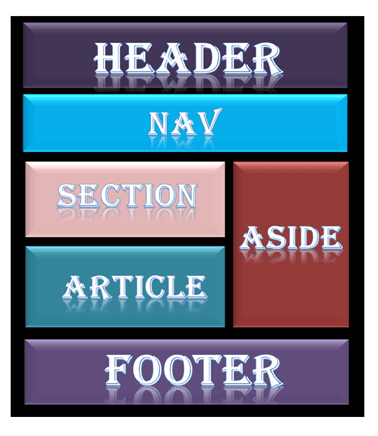
Every web page has different components to display the intended content and a specific UI. But still, there are few things which are templated and are globally accepted way to structure the web page, such as:
<header>: Stores the starting information about the web page.
<footer>: Represents the last section of the page.
<nav>: The navigation menu of the HTML page.
<article>: It is a set of information.
<section>: It is used inside the article block to define the basic structure of a page.
<aside>: Sidebar content of the page.
11. How to optimize website assets loading?
To optimize website load time we need to optimize its asset loading and for that:
CDN hosting – A CDN or content delivery network is geographically distributed servers to help reduce latency.
File compression – This is a method that helps to reduce the size of an asset to reduce the data transfer
File concatenation – This reduces the number of HTTP calls
Minify scripts – This reduces the overall file size of js and CSS files
Parallel downloads – Hosting assets in multiple subdomains can help to bypass the download limit of 6 assets per domain of all modern browsers. This can be configured but most general users never modify these settings.
Lazy Loading – Instead of loading all the assets at once, the non-critical assets can be loaded on a need basis.
12. What are the various formatting tags in HTML?
HTML has various formatting tags:
<b> – makes text bold
<i> – makes text italic
<em> – makes text italic but with added semantics importance
<big> – increases the font size of the text by one unit
<small> – decreases the font size of the text by one unit
<sub> – makes the text a subscript
<sup> – makes the text a superscript
<del> – displays as strike out text
<strong> – marks the text as important
<mark> – highlights the text
<ins> – displays as added text
13. What are the different kinds of Doctypes available?
The three kinds of Doctypes which are available:
Strict Doctype
Transitional Doctype
Frameset Doctype
14. Please explain how to indicate the character set being used by a document in HTML?
The character set is defined in <meta> tag inside <head> element.
15. What is the difference between <strong>, <b> tags and <em>, <i> tags?
The effect on a normal webpage of the tags <strong>, <b> and <em>, <i> is the same. <b> and <i> tags stands for bold and italic. These two tags only apply font styling and bold tag <b>, just adds more ink to the text, these tags don’t say anything about the text.
Whereas, <strong> and <em> tags represent that the span of text is of strong importance or more importance and emphatic stress respectively than the rest of the text. These tags have semantic meaning.
16. What is the significance of <head> and <body> tag in HTML?
<head> tag provides the information about the document. It should always be enclosed in the <html> tag. This tag contains the metadata about the webpage and the tags which are enclosed by head tag like <link>, <meta>, <style>, <script>, etc. are not displayed on the web page. Also, there can be only 1 <head> tag in the entire Html document and will always be before the <body> tag.
<body> tag defines the body of the HTML document. It should always be enclosed in the <html> tag. All the contents which needs to be displayed on the web page like images, text, audio, video, contents, using elements like <p>, <img>, <audio>, <heading>, <video>, <div>, etc. will always be enclosed by the <body> tag. Also, there can be only 1 body element in an HTML document and will always be after the <head> tag.
17. Can we display a web page inside a web page or Is nesting of webpages possible?
Yes, we can display a web page inside another HTML web page. HTML provides a tag <iframe> using which we can achieve this functionality.
<iframesrc=”urlofthewebpagetoembed” />
18. How is Cell Padding different from Cell Spacing?
Cell Spacing is the space or gap between two consecutive cells. Whereas, Cell Padding is the space or gap between the text/ content of the cell and the edge/ border of the cell. Please refer to the above figure example to find the difference.
19. How can we club two or more rows or columns into a single row or column in an HTML table?
HTML provides two table attributes “rowspan” and “colspan” to make a cell span to multiple rows and columns respectively.
20. Is it possible to change an inline element into a block level element?
Yes, it is possible using the “display” property with its value as “block”, to change the inline element into a block-level element.
21. In how many ways can we position an HTML element? Or what are the permissible values of the position attribute?
There are mainly 7 values of position attribute that can be used to position an HTML element:
static: Default value. Here the element is positioned according to the normal flow of the document.
absolute: Here the element is positioned relative to its parent element. The final position is determined by the values of left, right, top, bottom.
fixed: This is similar to absolute except here the elements are positioned relative to the <html> element.
relative: Here the element is positioned according to the normal flow of the document and positioned relative to its original/ normal position.
initial: This resets the property to its default value.
inherit: Here the element inherits or takes the property of its parent.
22. In how many ways you can display HTML elements?
inline: Using this we can display any block-level element as an inline element. The height and width attribute values of the element will not affect.
block: using this, we can display any inline element as a block-level element.
inline-block: This property is similar to inline, except by using the display as inline-block, we can actually format the element using height and width values.
flex: It displays the container and element as a flexible structure. It follows flexbox property.
inline-flex: It displays the flex container as an inline element while its content follows the flexbox properties.
grid: It displays the HTML elements as a grid container.
none: Using this property we can hide the HTML element.
Below are some of the display types which are rarely used:
table
inline-table
table-cell
table-column
table-row
inline-grid
list-item
inherit
initial
table-caption
23. What is the difference between “display: none” and “visibility: hidden”, when used as attributes to the HTML element.
When we use the attribute “visibility: hidden” for an HTML element then that element will be hidden from the webpage but still takes up space. Whereas, if we use the “display: none” attribute for an HTML element then the element will be hidden, and also it won’t take up any space on the webpage.
24. How to specify the link in HTML and explain the target attribute?
HTML provides a hyperlink – <a> tag to specify the links in a webpage. The ‘href’ attribute is used to specify the link and the ‘target’ attribute is used to specify, where do we want to open the linked document. The ‘target’ attribute can have the following values:
_self: This is a default value. It opens the document in the same window or tab as it was clicked.
_blank: It opens the document in a new window or tab.
_parent: It opens the document in a parent frame.
_top: It opens the document in a full-body window.
25. In how many ways can we specify the CSS styles for the HTML element?
There are three ways in which we can specify the styles for HTML elements:
Inline: Here we use the ‘style’ attribute inside the HTML element.
Internal: Here we use the <style> tag inside the <head> tag. To apply the style we bind the elements using ‘id’ or ‘class’ attributes.
External: Here we use the <link> tag inside <head> tag to reference the CSS file into our HTML code. Again the binding between elements and styles is done using ‘id’ or ‘class’ attributes.
26. Difference between link tag <link> and anchor tag <a>?
The anchor tag <a> is used to create a hyperlink to another webpage or to a certain part of the webpage and these links are clickable, whereas, link tag <link> defines a link between a document and an external resource and these are not clickable.
27. How to include javascript code in HTML?
HTML provides a <script> tag using which we can run the javascript code and make our HTML page more dynamic.
<!DOCTYPE html><html><body><h1><span>This is a demo for </span><u><spanid="demo"></span></u></h1><script>document.getElementById("demo").innerHTML = "script Tag"</script></body></html>
28. When to use scripts in the head and when to use scripts in the body?
If the scripts contain some event-triggered functions or jquery library then we should use them in the head section. If the script writes the content on the page or is not inside a function then it should be placed inside the body section at the bottom. In short, follow below three points:
Place library scripts or event scripts in the head section.
Place normal scripts that do not write anything on the page, in the head section until there is any performance issue.
Place scripts that render something on the web page at the bottom of the body section.
29. What are forms and how to create forms in HTML?
The HTML form is used to collect the user inputs. HTML provides a <form> tag to create forms. To take input from the user we use the <input> tag inside the form so that all collected user data can be sent to the server for processing. There are different input types like ‘button’, ‘checkbox’, ‘number’, ‘text’, ‘password’, ‘submit’ etc.
<formaction="/submit_data.php"><label>Enter your name: </label><inputtype="text"name="name" /><label>Enter Mobile number </label><inputtype="number"name="mobile_no"/><inputtype="submit"value="Submit"></form>
30. How to handle events in HTML?
HTML allows event trigger actions in browsers using javascript or JQuery. There are a lot of events like ‘onclick’, ‘ondrag’, ‘onchange’, etc.
<!DOCTYPE html><html><bodystyle="padding-top:50px"><h3id="event_demo">0</h3><inputtype="button"onclick="myFunction()"value="Click Me" /><inputtype="reset"onclick="reset()"value="Reset" /></body><script>functionmyFunction() {
var value = document.getElementById("event_demo").innerHTML
value = parseInt(value) + 1;
document.getElementById("event_demo").innerHTML = value;
}
functionreset() {
document.getElementById("event_demo").innerHTML = 0;
}
</script></html>
HTML5 Interview Questions
31. What are some of the advantages of HTML5 over its previous versions?
Some advantages of HTML5 are:-
It has Multimedia Support.
It has the capabilities to store offline data using SQL databases and application cache.
Javascript can be run in the background.
HTML5 also allows users to draw various shapes like rectangles, circles, triangles, etc.
Included new Semantic tags and form control tags.
32. How can we include audio or video in a webpage?
HTML5 provides two tags: <audio> and <video> tags using which we can add the audio or video directly in the webpage.
33. Inline and block elements in HTML5?
Inline
Block
Inline elements just take up the space that is absolutely necessary for the content and does not start from a new line. Example:- <span>, <a>, <strong>, <img>, <button>, <em>, <select>, <abbr>, <label>, <sub>, <cite>, <abbr>, <script>, <label>, <i>, <input>, <output>, <q>, etc.
Block elements start on a new line and consume the full width of the page available. Example:- <div>, <p>, <header>, <footer>, <h1>…<h6>, <form>, <table>, <canvas>, <video>, <blockquote>, <pre>, <ul>, <ol>, <figcaption>, <figure>, <hr>, <article>, <section>, etc.
34. What is the difference between <figure> tag and <img> tag?
The <figure> tag specifies the self-contained content, like diagrams, images, code snippets, etc. <figure> tag is used to semantically organize the contents of an image like image, image caption, etc., whereas the <img> tag is used to embed the picture in the HTML5 document.
35. How to specify the metadata in HTML5?
To specify we can use <meta> tag which is a void tag,i.e., it does not have a closing tag. Some of the attributes used with meta tags are name, content, http-equiv, etc. The below image tells how to specify the metadata.
36. Is the <datalist> tag and <select> tag same?
No. The <datalist> tag and <select> tag are different. In the case of <select> tag a user will have to choose from a list of options, whereas <datalist> when used along with the <input> tag provides a suggestion that the user selects one of the options given or can enter some entirely different value.
37. Define Image Map?
Image Map lets a developer map/link different parts of images with the different web pages. It can be achieved by the <map> tag in HTML5, using which we can link images with clickable areas.
Semantic elements are those which describe the particular meaning to the browser and the developer. Elements like <form>, <table>, <article>, <figure>, etc., are semantic elements.
39. Convert the below data into Tabular format in HTML5?
S.no., Language, Mostly used for
1, HTML, FrontEnd
2, CSS, FrontEnd
3, Python, BackEnd
40. What is the difference between <meter> tag and <progress> tag?
<progress> tag should be used when we want to show the completion progress of a task, whereas if we just want a scalar measurement within a known range or fraction value. Also, we can specify multiple extra attributes for <meter> tags like ‘form’, ‘low’, ‘high’, ‘min’, etc.
41. Is drag and drop possible using HTML5 and how?
Yes, in HTML5 we can drag and drop an element. This can be achieved using the drag and drop-related events to be used with the element which we want to drag and drop.
42. Difference between SVG and Canvas HTML5 element?
SVG
Canvas
SVG is a vector based i.e., composed of shapes.
It is Raster based i.e., composed of pixels.
SVG works better with a larger surface.
Canvas works better with a smaller surface.
SVG can be modified using CSS and scripts.
Canvas can only be modified using scripts.
SVG is highly scalable. So we can print at high quality with high resolution.
It is less scalable.
43. What type of audio files can be played using HTML5?
HTML5 supports the following three types of audio file formats:
Mp3
WAV
Ogg
44. What are the significant goals of the HTML5 specification?
These were the target area of the HTML5 specs:
Introduction of new element tags to better structure the web page such as <header> tag.
Forming a standard in cross-browser behavior and support for different devices and platforms
Backward compatible with the older version HTML web pages
Introduction of basic interactive elements without the dependency of plugins such as <video> tag instead of the flash plugin.
45. Explain the concept of web storage in HTML5.
This web storage helps in storing some of the static data in the local storage of the browser so that we do not need to fetch it from the server every time we need it. There is a size limit based on different browsers. This helps in decreasing the load time and a smooth user experience. There are two types of web storage that are used to store data locally in HTML5:
Local Storage – This helps in storing data that will be retained even though the user reopens the browser. It is stored for each webapp on different browsers.
Session Storage – This is used for one session only. After the user closes the browser this gets deleted.
46. What is Microdata in HTML5?
It is used to help extract data for site crawlers and search engines. It is basically a group of name-value pairs. The groups are called items, and each name-value pair is a property. Most of the search engines like Google, Microsoft, Yandex, etc follow schema.org vocabulary to extract this microdata.
48. What is new about the relationship between the <header> and <h1> tags in HTML5?
As HTML5 was all about better semantics and arrangements of the tags and elements, the <header> tag specifies the header section of the webpage. Unlike in previous version there was one <h1> element for the entire webpage, now this is the header for one section such as <article> or <section>. According to the HTML5 specification, each <header> element must at least have one <h1> tag.
49. Explain HTML5 Graphics.
HTML5 supports two kinds of graphics:
Canvas – It is like drawing on a whitepaper or a blank webpage. We can add different graphic designs on web pages with available methods for drawing various geometrical shapes.
52. Why do you think the addition of drag-and-drop functionality in HTML5 is important? How will you make an image draggable in HTML5?
The drag and drop functionality is a very intuitive way to select local files. This is similar to what most of the OS have copy functionality thus making it very easy for the user to comprehend. Before the native drag and drop API, this was achievable by writing complex Javascript programming or external frameworks like jQuery.
To enable this functionality there is a draggable attribute in the <img> tag and need to set ondrop and ondragover attribute to an eventhandler available in scripts.
MathML stands for Mathematical Markup Language. It is used for displaying mathematical expressions on web pages. For this <math> tag is used.
<!DOCTYPE HTML><html><head></head><body><math><mrow><mrow><msup><mi> a </mi><mn> 2 </mn></msup><mo> + </mo><msup><mi> b </mi><mn> 2 </mn></msup><mo> + </mo><mn> 2 </mn><mn> a </mn><mn> b </mn></mrow><mo> = </mo><mn> 0 </mn></mrow></math></body></html>
This displays the equation a2 + b2 + 2ab = 0.
54. What are the server-sent events in HTML5?
The events pushed from the webserver to the browsers are called server-sent events. DOM elements can be continuously updated using these events. This has a major advantage over straight-up polling. In polling, there is a lot of overhead since every time it is establishing an HTTP connection and tearing it down whereas, in server-sent events, there is one long-lived HTTP connection. To use a server-sent event, <eventsource> element is used. The src attribute of this element specifies the URL from which sends a data stream having the events.
<eventsourcesrc = "/cgi-bin/myfile.cgi" />
55. What are Web Workers?
These are added to bring parallelism and async capability. It runs in the background to do the computationally expensive tasks without yielding to make the page responsive. It is achieved by starting a separate thread for such tasks. These are not meant to perform UI operations. There are three types of web workers:
Dedicated Workers – These are workers that are utilized by a single script.
Shared Workers -These are workers that are utilized by multiple scripts running in different windows, IFrames, etc.
Service Workers – These act as proxy servers between web applications, the browser, and the network. Mostly used for push notifications and sync APIs.
56. What is the usage of a novalidate attribute for the form tag that is introduced in HTML5?
Its value is a boolean type that indicates whether or not the data being submitted by the form will be validated beforehand. By making this false, forms can be submitted without validation which helps users to resume later also.
Raster Images – The raster image is defined by the arrangement of pixels in a grid with exactly what color the pixel should be. Few raster file formats include PNG(.png), JPEG(.jpg), etc. Vector Images – The vector image is defined using algorithms with shape and path definitions that can be used to render the image on-screen written in a similar markup fashion. The file extension is .svg
58. How to support SVG in old browsers?
To support old browsers instead of defining the resource of svg in src attribute of <img> tag, it should be defined in srcset attribute and in src the fallback png file should be defined.
59. What are different approaches to make an image responsive?
Art direction – Using <picture> element the landscape image fully shown in desktop layout can be zoomed in with the main subject in focus for a portrait layout.
Resolution switching – Instead of zoom and crop the images can be scaled accordingly using vector graphics. Also, this can be further optimized to serve different pixel density screens as well.
The manifest file is used to list down resources that can be cached. Browsers use this information to make the web page load faster than the first time. There are 3 sections in the manifest file
CACHE Manifest – Files needs to be cached
Network – File never to be cached, always need a network connection.
Fallback – Fallback files in case a page is inaccessible
Geolocation API is used to share the physical location of the client with websites. This helps in serving locale-based content and a unique experience to the user, based on their location. This works with a new property of the global navigator object and most of the modern browsers support this.
var geolocation = navigator.geolocation;
62. Write HTML5 code to demonstrate the use of Geolocation API.
<!DOCTYPE html><html><body><p>Click "try it" button to get your coordinates.</p><buttononclick="getLocation()">Try It</button><pid="demo"></p><script>var x = document.getElementById("demo");
functiongetLocation() {
if (navigator.geolocation) {
navigator.geolocation.getCurrentPosition(showPosition);
} else {
x.innerHTML = "Geolocation functionality is not supported by this browser.";
}
}
functionshowPosition(position) {
x.innerHTML = "Latitude: " + position.coords.latitude +
"<br>Longitude: " + position.coords.longitude;
}
</script></body></html>
The above example asks for user permission for accessing the location data via geolocation API and after clicking the button the coordinates of the physical location of the client get displayed.
63. Explain Web Components and it’s usage.
These are used to create reusable custom elements which are very difficult in traditional HTML. It consists of three technologies:
Custom elements – These are JavaScript APIs that help in defining custom elements and their behavior.
Shadow DOM – These are JavaScript APIs that attach an encapsulated shadow DOM tree to an element to keep the element’s features private and unaffected by other parts.
<!DOCTYPE html><html><head><metacharset="utf-8"><title>composed and composedPath demo</title><scriptsrc="main.js"defer></script></head><body><h1><code>composed</code> and <code>composedPath</code> demo</h1><open-shadowtext="I have an open shadow root"></open-shadow><closed-shadowtext="I have a closed shadow root"></closed-shadow></body></html>
Here 2 custom elements are defined <open-shadow> and <closed-shadow> which takes their text content and inserts them into a shadow DOM as content of a <p> element.
HTML templates – The markup templates are written using <template> and <slot> elements which can be reused multiple times as the basis of a custom element’s structure.
<!DOCTYPE html><html><head><metacharset="utf-8"><title>Simple template</title><scriptsrc="main.js"></script></head><body><h1>Simple template</h1><templateid="my-paragraph"><style>p {
color: white;
background-color: #666;
padding: 5px;
}
</style><p><slotname="my-text">My default text</slot></p></template><my-paragraph><spanslot="my-text">Let's have some different text!</span></my-paragraph><my-paragraph><ulslot="my-text"><li>Let's have some different text!</li><li>In a list!</li></ul></my-paragraph></body></html>
HTML stands for Hyper Text Markup Language. It is a language of World Wide Web. It is a standard text formatting language which is used to create and display pages on the Web. It makes the text more interactive and dynamic. It can turn text into images, tables, links. More details.
2) What are Tags?
HTML tags are composed of three things: an opening tag, content and ending tag. Some tags are unclosed tags.
HTML documents contain two things:
content, and
tags
When a web browser reads an HTML document, the browser reads it from top to bottom and left to right. HTML tags are used to create HTML documents and render their properties. Each HTML tags have different properties.
Syntax
<tag> content </tag>
Content is placed between tags to display data on the web page.
No. There are some HTML tags that don’t need a closing tag. For example: <image> tag, <br> tag. More details.
4) What is formatting in HTML?
The HTML formatting is a process of format the text for a better look and feel. It uses different tags to make text bold, italicized, underlined. More details.
5) How many types of heading does an HTML contain?
The HTML contains six types of headings which are defined with the <h1> to <h6> tags. Each type of heading tag displays different text size from another. So, <h1> is the largest heading tag and <h6> is the smallest one. For example:
7) Which HTML tag is used to display the data in the tabular form?
The HTML table tag is used to display data in tabular form (row * column). It also manages the layout of the page, e.g., header section, navigation bar, body content, footer section. Here is the list of tags used while displaying the data in the tabular form:
Tag
Description
<table>
It defines a table.
<tr>
It defines a row in a table.
<th>
It defines a header cell in a table.
<td>
It defines a cell in a table.
<caption>
It defines the table caption.
<colgroup>
It specifies a group of one or more columns in a table for formatting.
<col>
It is used with <colgroup> element to specify column properties for each column.
<tbody>
It is used to group the body content in a table.
<thead>
It is used to group the header content in a table.
<tfooter>
It is used to group the footer content in a table.
8) What are some common lists that are used when designing a page?
There are many common lists which are used to design a page. You can choose any or a combination of the following list types:
Ordered list – The ordered list displays elements in numbered format. It is represented by <ol> tag.
Unordered list – The unordered list displays elements in bulleted format. It is represented by <ul> tag.
Definition list – The definition list displays elements in definition form like in dictionary. The <dl>, <dt> and <dd> tags are used to define description list.
9) What is the difference between HTML elements and tags?
HTML elements communicate to the browser to render text. When the elements are enclosed by brackets <>, they form HTML tags. Most of the time, tags come in a pair and surround content.
10) What is semantic HTML?
Semantic HTML is a coding style. It is the use of HTML markup to reinforce the semantics or meaning of the content. For example: In semantic HTML <b> </b> tag is not used for bold statement as well as <i> </i> tag is used for italic. Instead of these we use <strong></strong> and <em></em> tags.
11) What is an image map?
Image map facilitates you to link many different web pages using a single image. It is represented by <map> tag. You can define shapes in images that you want to make part of an image mapping.
12) How to insert a copyright symbol on a browser page?
The HTML iframe tag is used to display a nested webpage. In other words, it represents a webpage within a webpage. The HTML <iframe> tag defines an inline frame. For example:
<!DOCTYPE html>
<html>
<body>
<h2>HTML Iframes example</h2>
<p>Use the height and width attributes to specify the size of the iframe:</p>
14) How do you keep list elements straight in an HTML file?
You can keep the list elements straight by using indents.
15) Does a hyperlink only apply to text?
No, you can use hyperlinks on text and images both. The HTML anchor tag defines a hyperlink that links one page to another page. The “href” attribute is the most important attribute of the HTML anchor tag.
A style sheet is used to build a consistent, transportable, and well-designed style template. You can add these templates on several different web pages. It describes the look and formatting of a document written in markup language.
17) Can you create a multi-colored text on a web page?
Yes. To create a multicolor text on a web page you can use <font color =”color”> </font> for the specific texts you want to color.
18) Is it possible to change the color of the bullet?
The color of the bullet is always the color of the first text of the list. So, if you want to change the color of the bullet, you must change the color of the text.
19) Explain the layout of HTML?
HTML layout specifies a way in which the web page is arranged.
Every website has a specific layout to display content in a specific manner.
Following are different HTML5 elements which are used to define the different parts of a webpage.
<header>: It is used to define a header for a document or a section.
<nav>: It is used to define a container for navigation links
<section>: It is used to define a section in a document
<article>: It is used to define an independent, self-contained article
<aside>: It is used to define content aside from the content (like a sidebar)
<footer>: It is used to define a footer for a document or a section
20) What is a marquee?
Marquee is used to put the scrolling text on a web page. It scrolls the image or text up, down, left or right automatically. You should put the text which you want to scroll within the <marquee>……</marquee> tag. More details.
21) How many tags can be used to separate a section of texts?
Three tags are used to separate the texts.
<br> tag – Usually <br> tag is used to separate the line of text. It breaks the current line and conveys the flow to the next line
<p> tag – The <p> tag contains the text in the form of a new paragraph.
<blockquote> tag – It is used to define a large quoted section. If you have a large quotation, then put the entire text within <blockquote>………….</blockquote> tag.
22) How to make a picture of a background image of a web page?
To make a picture a background image on a web page, you should put the following tag code after the </head> tag.
<bodybackground = “image.gif”>
Here, replace the “image.gif” with the name of your image file which you want to display on your web page.
23) What are empty elements?
HTML elements with no content are called empty elements. For example: <br>, <hr> etc.
24) What is the use of a span tag? Give one example.
The span tag is used for following things:
For adding color on text
For adding background on text
Highlight any color text
Example:
<p>
<spanstyle=“color:#ffffff;”>
In this page we use span.
</span>
</p>
25) What is the use of an iframe tag?
An iframe is used to display a web page within a web page.
The HTML character entities are used as a replacement for reserved characters in HTML. You can also replace characters that are not present on your keyboard by entities. These characters are replaced because some characters are reserved in HTML.
27) Why is a URL encoded in HTML?
An URL is encoded to convert non-ASCII characters into a format that can be used over the Internet because a URL is sent over the Internet by using the ASCII character-set only. If a URL contains characters outside the ASCII set, the URL has to be converted. The non-ASCII characters are replaced with a “%” followed by hexadecimal digits.
28) Does a <!DOCTYPE html> tag is a HTML tag?
No, the <!DOCTYPE html> declaration is not an HTML tag. There are many type of HTML e.g. HTML 4.01 Strict, HTML 4.01 Transitional, HTML 4.01 Frameset, XHTML 1.0 Strict, XHTML 1.0 Transitional, XHTML 1.0 Frameset, XHTML 1.1 etc. So, <!DOCTYPE html> is used to instruct the web browser about the HTML page.
HTML5 Interview Questions
Let’s see a list of top HTML5 interview questions and answers.
29) What is the canvas element in HTML5?
The <canvas> element is a container that is used to draw graphics on the web page using scripting language like JavaScript. It allows for dynamic and scriptable rendering of 2D shapes and bitmap images. There are several methods in canvas to draw paths, boxes, circles, text and add images. For Example:
HTML SVG is used to describe the two-dimensional vector and vector/raster graphics. SVG images and their behaviors are defined in XML text files. So as XML files, you can create and edit an SVG image with the text editor. It is mostly used for vector type diagrams like pie charts, 2-Dimensional graphs in an X, Y coordinate system.
35) What is the difference between progress and meter tag?
The progress tag is used to represent the progress of the task only while the meter tag is used to measure data within a given range. More details.
36) What is the use of figure tag in HTML 5?
The figure tag is used to add a photo in the document on the web page. It is used to handle the group of diagrams, photos, code listing with some embedded content.
<p>The Taj Mahal is widely recognized as “the jewel of Muslim art in India and one of the universally admired masterpieces of the world’s heritage.”</p>
The <figcaption> element is used to provide a caption to an image. It is an optional tag and can appear before or after the content within the <figure> tag. The <figcaption> element is used with <figure> element and it can be placed as the first or last child of the <figure> element.
The button tag is used in HTML 5. It is used to create a clickable button within the HTML form on the web page. It is generally used to create a “submit” or “reset” button. Let’s see the code to display the button.
The details tag is used to specify some additional details on the web page. It can be viewed or hidden on demand. The summary tag is used with details tag. More details.
40) What is datalist tag?
The HTML 5 datalist tag provides an autocomplete feature on the form element. It facilitates users to choose the predefined options to the users to select data.
<label>
Enter your favorite cricket player: Press any character<br/>
42) If I do not put <!DOCTYPE html> will HTML 5 work?
No, the browser will not be able to identify that it is an HTML document and HTML 5 tags do not function properly..
43) What is the use of the required attribute in HTML5?
It forces a user to fill text on the text field or text area before submitting the form. It is used for form validation.
Example:
Name: <inputtype=“text”name=“name” required>
44) What are the new <input> types for form validation in HTML5?
The new input types for form validation are email, URL, number, tel, and date.
1. What are New Semantic/Structural Elements HTML5
<article> Specifies independent, self-contained content, could be a news-article, blog post, forum post, or other articles which can be distributed independently from the rest of the site.
<aside> For content aside from the content it is placed in. The aside content should be related to the surrounding content
<bdi> For text that should not be bound to the text-direction of its parent elements A button, or a radiobutton, or a checkbox
<details> For describing details about a document, or parts of a document
<summary> A caption, or summary, inside the details element
<figure> For grouping a section of stand-alone content, could be a video
<figcaption> The caption of the figure section
<footer> For a footer of a document or section, could include the name of the author, the date of the document, contact information, or copyright information
<header> For an introduction of a document or section, could include navigation
<hgroup> For a section of headings, using <h1> to <h6>, where the largest is the main heading of the section, and the others are sub-headings
<mark> For text that should be highlighted
<meter> For a measurement, used only if the maximum and minimum values are known
<nav> For a section of navigation
<progress> The state of a work in progress
<ruby> For ruby annotation (Chinese notes or characters)
<rt> For explanation of the ruby annotation
<rp> What to show browsers that do not support the ruby element
<section> For a section in a document. Such as chapters, headers, footers, or any other sections of the document
<time> For defining a time or a date, or both
<wbr> Word break. For defining a line-break opportunity.
2. Defines a visible heading for a element <figcaption> Defines a caption for a <figure> element <footer> Defines a footer for a document or section 3. Defines a header for a document or section <meter> Defines a scalar measurement within a known range (a gauge) <nav> Defines navigation links <progress> Represents the progress of a task <ruby> Defines a ruby annotation (for East Asian typography) <rt> Defines an explanation/pronunciation of characters (for East Asian typography) <rp> Defines what to show in browsers that do not support ruby annotations <section> Defines a section in a document <time> Defines a date/time <wbr> Defines a possible line-break
4. What is the difference between HTML and HTML5 ?
HTML5 is nothing more then upgraded version of HTML where in HTML5 Lot of new future like Video, Audio/mp3, date select function , placeholder , Canvas, 2D/3D Graphics, Local SQL Database added so that no need to do external plugin like Flash player or other library
5. What is the <!DOCTYPE> ? Is it necessary to use in HTML5 ?
The <!DOCTYPE> is an instruction to the web browser about what version of HTML the page is written in. AND The <!DOCTYPE> tag does not have an end tag and It is not case sensitive.
The <!DOCTYPE> declaration must be the very first thing in HTML5 document, before the <html> tag.
As In HTML 4.01, all <! DOCTYPE > declarations require a reference to a Document Type Definition (DTD), because HTML 4.01 was based on Standard Generalized Markup Language (SGML).
WHERE AS HTML5 is not based on SGML, and therefore does not require a reference to a Document Type Definition (DTD).
6. How to add video and audio in HTML5
The canvas element is used to draw graphics images on a web page by using javascript like below
Before HTML5 LocalStores was done with cookies. Cookies are not very good for large amounts of data, because they are passed on by every request to the server, so it was very slow and in-effective.
In HTML5, the data is NOT passed on by every server request, but used ONLY when asked for. It is possible to store large amounts of data without affecting the website’s performance.and The data is stored in different areas for different websites, and a website can only access data stored by itself.
And for creating localstores just need to call localStorage object like below we are storing name and address
8. What is the sessionStorage Object in html5 ? How to create and access?
The sessionStorage object stores the data for one session. The data is deleted when the user closes the browser window. like below we can create and access a sessionStorage here we created “name” as session
HTML5 is the proposed next standard for HTML 4.01, XHTML 1.0 and DOM Level 2 HTML.
It aims to reduce the need for proprietary plug-in-based rich internet application (RIA) technologies such as Adobe Flash, Microsoft Silverlight, Apache Pivot, and Sun JavaFX.
11. What does a <hgroup> tag do?
The <hgroup> tag is used to group heading elements. The <hgroup> element is used to group a set of <h1> to <h6> elements.
<hgroup> <h1>Hello</h1> <h2>How r u?</h2> </hgroup>
12. Which video formats are used for the video element? Internet Explorer 9+: MP4
13. What is the status of the development of the HTML 5 standard?
HTML5 is being developed as the next major revision of HTML (HyperText Markup Language), the core markup language of the World Wide Web.
The Web Hypertext Application Technology Working Group (WHATWG) started work on the specification in June 2004 under the name Web Applications 1.0. As of March 2010, the specification is in the Draft Standard state at the WHATWG, and in Working Draft state at the W3C.
14. What are the new APIs provided by the HTML 5 standard? Give a briefdescription of each
The canvas element: Canvas consists of a drawable region defined in HTML code with height and width attributes. JavaScript code may access the area through a full set of drawing functions similar to other common 2D APIs, thus allowing for dynamically generated graphics. Some anticipated uses of the canvas include building graphs, animations, games, and image composition.
► Timed media playback ► Offline storage database ► Document editing ► Drag-and-drop ► Cross-document messaging ► Browser history management ► MIME type and protocol handler registration
15. What other advantages does HTML5 have? ► Cleaner markup ► Standardized approach to mobile devices support ► Additional semantics of new elements like <header>, <nav>, and <time>
► New form input types and attributes that will (and in Opera’s case, do) take the hassle out of scripting forms.
16. WHAT IS THE DIFFERENCE BETWEEN HTML5 APPLICATION CACHEAND REGULATE HTML BROWSER CACHE?
The new HTML5 specification allows browsers to prefetch some or all of a website assets such as HTML files, images, CSS, JavaScript, and so on, while the client is connected.
It is not necessary for the user to have accessed this content previously, for fetching this content. In other words, application cache can prefetch pages that have not been visited at all and are thereby unavailable in the regular browser cache.
Prefetching files can speed up the site’s performance, though you are of course using bandwidth to download those files initially.
17. Explain WHAT OTHER ADVANTAGES DOES HTML5 HAVE?
a) Cleaner markup b) Additional semantics of new elements like <header>, <nav>, and <time> c) New form input types and attributes that will (and in Opera’s case, do) take the hassle out of scripting forms.
18. HOW DO YOU PLAY A VIDEO and audio USING HTML5?
We can display video using the tag as shown below:
20. What is the difference between HTMl5 Application cache and regular HTML browser cache?
HTML5 specification allows browsers to prefetch some or all of a website assets such as HTML files, images, CSS, JavaScript, and so on, while the client is connected. It is not necessary for the user to have accessed this content previously, for fetching this content. In other words, application cache can prefetch pages that have not been visited at all and are thereby unavailable in the regular browser cache. Prefetching files can speed up the site’s performance, though you are of course using bandwidth to download those files initially.
21. Tell me What purpose does HTML5 serve?
HTML5 is the proposed next standard for HTML 4.01, XHTML 1.0 and DOM Level 2 HTML. It aims to reduce the need for proprietary plug-in-based rich internet application (RIA) technologies such as Adobe Flash, Microsoft Silverlight, Apache Pivot, and Sun JavaFX.
22. What is the purpose of HTML5 versus XHTML?
HTML5 is the next version of HTML 4.01, XHTML 1.0 and DOM Level 2 HTML. It aims to reduce the need for proprietary plug-in-based rich internet application (RIA) technologies such as Adobe Flash, Microsoft Silverlight, Apache Pivot, and Sun JavaFX. Instead of using those plugins, it enables browser to serve elements such as video and audio without any additional requirements on the client machine.
23. WHAT are some other advantages of HTML5?
a) Cleaner markup than earlier versions of HTML b) Additional semantics of new elements like <header>, <nav>, and <time> c) New form input types and attributes that will (and in Opera’s case, do) take the hassle out of scripting forms. Related article on DGlobalTech.com • Flash versus HTML5 • HTML5 – Video and Audio File formats and browser support • HTML Javascript online Realtime Editor
24. What are the New Media Elements in HTML5?
New Media Elements in HTML5 are : Tag Description <audio> For multimedia content, sounds, music or other audio streams <video> For video content, such as a movie clip or other video streams <source> For media resources for media elements, defined inside video or audio elements For embedded content, such as a plug-in <track> For text tracks used in mediaplayers
25. What is the major improvement with HTML5 in reference to Flash?
Flash is not supported by major mobile devices such as iPad, iPhone and universal android applications. Those mobile devices have lack of support for installing flash
plugins. HTML5 is supported by all the devices, apps and browser including Apple and Android products. Compared to Flash, HTML5 is very secured and protected. That eliminates major concerns that we have seen with Flash.
26. HTML5 – New Features
Some of the most interesting new features in HTML5: • The <canvas> element for 2D drawing • The <video> and <audio> elements for media playback • Support for local storage • New content-specific elements, like <article>, <footer>, <header>, <nav>, <section> New form controls, like calendar, date, time, email, url, search
27. What is the difference between CSS and CSS3 ?
CSS3 is upgreaded version of CSS with new future like Selectors,Box Model, Backgrounds and Borders, Text Effects,2D/3D Transformations, Animations, Multiple Column Layout,User Interface etc
28. List out CSS3 modules
Below are the listed major modules • Selectors • Box Model • Backgrounds and Borders • Text Effects • 2D/3D Transformations • Animations • Multiple Column Layout • User Interface
29. What new futures added in CSS3 for Borders and how Browser Support it?
and all modern Browser Support it like below Internet Explorer 9 supports border-radius and box-shadow Firefox requires the prefix -moz- for border-image. Chrome and Safari requires the prefix -webkit- for border-image. Opera requires the prefix -o- for border-image.
30. How you will create Rounded Corners using css3
We have to creat a class like below <style> .roundc{ border:2px solid #ff0000; border-radius:25px; background:#dddddd; width:300px; -moz-border-radius:25px; /* Firefox */ -webkit-border-radius:25px; /* Chrome and Safari */ -o-border-radius:25px; /* Opera */ } </style> and we have to add this class where we want the round corner like in below div <div class=”roundc” > this is the round corner by css3 </div> This is the div and round corner by css3
31. How we create border using images by CSS3
By using border-image: property of css3 we can create a border using images like below .roundpcds { border-image:url(borderpcds.png) 30 30 round; -moz-border-image:url(borderpcds.png) 30 30 round; /* Firefox */ -webkit-border-image:url(borderpcds.png) 30 30 round; /* Safari and Chrome */ -o-border-image:url(borderpcds.png) 30 30 round; /* Opera */ }
The background-size property specifies the size of the background image. As we know Before CSS3, the background image size was find out by the real size of the image. In CSS3 it is possible to specify the size of the background image, which allows you to re-use background images in different ways. .pcdsbp1 { background:url(background.gif); -moz-background-size:80px 60px; /* Firefox 3.6 */ background-size:80px 60px; /* or we can do background-size:100% 100%;*/ background-repeat:no-repeat; }
33. What is the CSS3 animation ?
When the animation is created in the @keyframe, bind it to a selector, otherwise the animation will have no effect.
Bind the animation to a selector by specifying at least these two CSS3 animation properties: • Specify the name of the animation • Specify the duration of the animation
34. What is the usage of canvas Element in HTML 5?
<canvas> is an element in HTML5 which we can use to draw graphics with the help of scripting (which is most probably JavaScript).
This element behaves like a container for graphics and rest of the things will be done by scripting. We can draw images, graphs and a bit of animations etc. using <canvas> element.
35. What are the different types of storage in HTML 5?
HTML 5 has the capability to store data locally. Previously, it was done with the help of cookies. The exciting thing about this storage is that it’s fast as well as secure. There are two different objects which can be used to store data:
localStorage object stores data for a longer period of time even if the browser is closed. sessionStorage object stores data for a specific session.
36. What are the deprecated Elements in HTML5 from HTML4?
Elements that are deprecated from HTML 4 to HTML 5 are:
frame frameset noframe applet big center basefront
37. What are the new APIs provided by HTML 5 standard?
HTML 5 standard comes with a number of new APIs. Few of them are as follows:
Media API Text Track API Application Cache API User Interaction Data Transfer API Command API Constraint Validation API History API
and many more….
38. What is the difference between HTML 5 Application Cache and regular HTMLBrowser Cache?
One of the key features of HTML 5 is “Application Cache” that enables us to make an offline version of a web application. It allows to fetch few or all of website contents such as HTML files, CSS, images, JavaScript, etc. locally. This feature speeds up the site performance. This is achieved with the help of a manifest file defined as follows
39. Wht is a CSS File? It is used for what purpose
CSS stands for “Cascading Style Sheets”, and are used to control and manage font styles, font sizes, and web site color combinations that are used in a web page. In order to retain continuity of “look and feel” throughout a website, all pages within a website will often refer to a single CSS file. The CSS file is typically contained in a separate file from the website, and the various web pages retrieve the CSS file each time a web page is displayed. CSS files make global appearance changes easy — a single change in a CSS file will mean that any pages using that CSS file will automatically display the changes
40. How do I make a picture as a background on my web pages?
Point the body background to the name of your image you wish to use as the background as shown below. This body line should be the first line after your < / head> tag. <body background=”picture.gif” > You can also have the background image fixed, so it does not move when using the scroll bar in the browser. To do this add the BGPROPERTIES tag as shown below.
Keep in mind not all browsers support scrolling text. however to do this add a tag similar to the below example:
< marquee >THIS WOULD SCROLL< /marquee>
The above example would create the below scrolling text. If your browser supports scrolling text the below example should be scrolling. More examples can be found on our main HTML page that lists most of the HTML commands.
42. How do I make it so that someone can mail me by just clicking on text withsubject?
Use the mailto command in your A HREF link tag as shown below.
Click here to mail Computer Hope .
43. How do I align pictures so that one may be higher or lower than the other?
Use the align statement in your IMG SRC tag as shown below.
Also, instead of align=top you can do align=middle, and align=bottom.
44. What is external Style Sheet? How to link?
External Style Sheet is a template/document/file containing style information which can be linked with any number of HTML documents. This is a very convenient way of formatting the entire site as well as restyling it by editing just one file. The file is linked with HTML documents via the LINK element inside the HEAD element. Files containing style information must have extension .css, e.g. style.css.
<HEAD>
</ HEAD>
45. Is CSS case sensitive?
Cascading Style Sheets (CSS) is not case sensitive. However, font families, URLs to images, and other direct references with the style sheet may be. The trick is that if you write a document using an XML declaration and an XHTML doctype, then the CSS class names will be case sensitive for some browsers. It is a good idea to avoid naming classes where the only difference is the case, for example: div.myclass { …} div.myClass { … } If the DOCTYPE or XML declaration is ever removed from your pages, even by mistake, the last instance of the style will be used, regardless of case.
46. What are the five possible values for “position”?
Values for position: static, relative, absolute, fixed, inherit
47. What does isNaN function do?
Return true if the argument is not a number.
48. What is Opacity in CSS3?
Opacity is used to show or hide the htmlelement For example 0 for hide and 1 for show.
49. What is the other name of combined selector in CSS3 and what is it used for?
The other name of combined selector in CSS3 is known as Grouping
50. How is multiple background images handled in CSS3?
If you want to use the multiple background ,we can insert as follows… background-image: url(decoration.png), url(ribbon.png), url(old_paper.jpg); also we can mention the position of the image either percentage value or top left, left center like this
51. What is wrapping in CSS3?What is wrapping in CSS3?
Wrapping is a vital propertyproperty for proper display of contents in webweb pages. If wrapping is disabled then the user could not display and view long lines that gwrapping is disabled then the user could not display and view long lines that gwrapping is disabled then the user could not display and view long lines that goes outside the window boundary and thus becomes useless.boundary and thus becomes useless.
Definition:
The wrap() method wraps specified HTML element(s) around each selected element.The wrap() method wraps specified HTML element(s) around each selected element.The wrap() method wraps specified HTML element(s) around each selected element.
Where wrapping Element Specifies what HTML elemeWhere wrapping Element Specifies what HTML element(s) to wrap around each nt(s) to wrap around each selected element.It’s compulsory. selected element.It’s compulsory.
Possible values:
HTML elements jQuery objects DOM elements
function(index)is Optional. Specifies a function that returns the wrapping element is Optional. Specifies a function that returns the wrapping element is Optional. Specifies a function that returns the wrapping element
index – Returns the index position of the element Returns the index position of the element in the set
52. What is the syntax of opacity in CSS3What is the syntax of opacity in CSS3? Firefox uses the property opacity:xFirefox uses the property opacity:xEx:style=”opacity:0.4; IE uses filter:alpha (opacity=x)x)Ex:filter:alpha(opacity=40)”
53. What is CSS rule ‘ruleset’?What is CSS rule ‘ruleset’?There are two types of CSS rules: ruThere are two types of CSS rules: ruleset and at-rule. Ruleset identifies selector or selectorsselectorsand declares style which is to be attached to and declares style which is to be attached to
that selector or selectors. For example P {text-indent: 10pt} is a CSS rule. CSS rulesets consist of two parts: selector, e.g. P and declaration, e.g. {text-indent: 10pt}. P {text-indent: 10pt} – CSS rule (ruleset) {text-indent: 10pt} – CSS declaration text-indent – CSS property 10pt – CSS value
54. What are the various style sheets?
Inline, external, imported and embedded are the different types of style sheets.
55. What are style sheet properties?CSS Background CSS Text CSS Font CSS Border CSS Outline CSS Margin CSS Padding CSS List CSS Table
56. List various font attributes used in style sheet? font-style font-variant font-weight font-size/line-height font-family caption icon menu message-box
small-caption status-bar
57. Do you know New Input Type Attribute in HTML5
TypeTel The input is of type telephone number search The input field is a search field urla URLemail One or more email addresses datetime A date and/or time DateA datemonth A month week A week Time The input value is of type time datetime-localA local date/time number A number range A number in a given range color A hexadecimal color, like #82345c Specifies a short hint that describes the expected value of an input placeholder field
Value
58. What is the sessionStorage Object in html5 ? How to create and access ?
The sessionStorage object stores the data for one session. The data is deleted when the user closes the browser window. like below we can create and access a sessionStorage here we created “name” as session <script type=”text/javascript”> sessionStorage.name=”PCDS”; document.write(sessionStorage.name); </script>
59. What new futures added in CSS3 for Borders and how Browser Support it?
following border futures added
border-radius box-shadow border-image
and all modern Browser Support it like below
Internet Explorer 9 supports border-radius and box-shadow
Firefox requires the prefix -moz- for border-image.
Chrome and Safari requires the prefix -webkit- for border-image.
Opera requires the prefix -o- for border-image
60. What is the CSS3 The background size Property
The background-size property specifies the size of the background image. As we know Before CSS3, the background image size was find out by the real size of the image. In CSS3 it is possible to specify the size of the background image, which allows you to re-use background images in different ways. .pcdsbp1 { background:url(background.gif); -moz-background-size:80px 60px; /* Firefox 3.6 */ background-size:80px 60px; /* or we can do background-size:100% 100%;*/ background-repeat:no-repeat; }
61. What is the word wrap / word wrapping in CSS3 ?
to Allow long words to be able to break and wrap onto the next line in css3 we used word-wrap property like below class .wordwrappcds{word-wrap:break-word;}
62. How you will create Box Shadow and text Shadow using CSS3
and then need to use these class boxshadownpcds ,textshadowpcds
63. What is the CSS3 animation ?
When the animation is created in the @keyframe, bind it to a selector, otherwise the animation will have no effect.
Bind the animation to a selector by specifying at least these two CSS3 animation properties:
Specify the name of the animation
Specify the duration of the animation
1 What is the difference between CSS and CSS3 2 List out CSS3 modules 3 What new futures added in CSS3 for Borders and how Browser Support it? 4 How to create Rounded Corners using css3? 5 How to create border using images by CSS3? 6 How to create Box Shadow and text Shadow using CSS3? 7 What is the CSS3 The background size Property? 8 What is the word wrap/word wrapping in CSS3? 9 What is the CSS3 animation? 10 What is opacity in CSS3? 11 What is the syntax of opacity in CSS3? 12 What is the syntax of word wrap in CSS3? 13 How is white-space property of CSS3 used? 14 Explain How flexibility is achieved more in CSS3? 15 Explain What are the values that can be taken by property white-space of CSS3?
1 What is the status of the development of the HTML 5 standard? 2 What are the new APIs provided by the HTML 5 standard? Give a brief description of each 3 What purpose does HTML5 serve? 4 What other advantages does HTML5 have? 5 WHAT IS THE DIFFERENCE BETWEEN HTML5 APPLICATION CACHE AND REGULATE HTML BROWSER CACHE? 6 WHAT IS HTML5? 7 GIVE AN EXAMPLE OF NEW ELEMENTS IN HTML5 TO SUPPORT MULTIMEDIA AND GRAPHICS? 8 Explain WHAT OTHER ADVANTAGES DOES HTML5 HAVE? 9 WHAT ARE THE DIFFERENT TYPES OF STORAGE IN HTML5? 10 What is the difference between HTMl5 Application cache and regular HTML browser cache? 11 Tell me What purpose does HTML5 serve? 12 Can you explain What the use of Canvas Element in HTML5? 13 Do you know What is the sessionStorage Object in html5? How to create and access? 14 Explain What is the use of localStorage in HTML5? 15 Tell me How to add video and audio in HTML5 16 Tell me Do you know New Input Type Attribute in HTML5 17 Explain What are the New Media Elements in HTML5? is canvas element used in HTML5 18 Explain How many New Markup Elements you know in HTML5 19 Tell me What is the <!DOCTYPE>? Is it necessary to use in HTML5 20 Explain the difference between HTML and HTML5
What is XML?
XML (Extensible markup language) is all about describing data. Below is a XML which describes book store. < ?xml version=”1.0″ encoding=”ISO-8859-1″? > < book> < php>php by pcds infotech< /php> < java>Jave j2ee by pcds infotec< /java> An XML tag is not something predefined but it is something you have to define according to your needs. For instance in the above example of books all tags are defined according to business needs. The XML document is self explanatory, any one can easily understand looking at the XML data what exactly it means.
What is the version information in XML?
“version” tag shows which version of XML is used.
What is ROOT element in XML ?
In our XML sample given previously < book> tag is the root element. Root element is the top most elements for a XML. and it’s must be unique
If XML does not have closing tag will it work ?
No, every tag in XML which is opened should have a closing tag. For instance in the top if we remove tag that XML will not be understood by lot of application.
What is the difference between XML and HTML?
XML describes data while HTML describes how the data should be displayed. So HTML is about displaying information while XML is about describing and storing the information.
Is XML case sensitive ?
Yes, they are case sensitive.
Is XML meant to replace HTML?
No, they both go together one is for describing data while other is for displaying data.
Can you explain why your project needed XML ? or why you have chosen XML.
Remember XML was meant to exchange data between two entities as we can define our user friendly tags with ease. In real world scenarios XML is meant to exchange data. For instance we have two applications who want to exchange information. But because they work in two complete opposite technologies it’s difficult to do it technically. For instance one application is made in JAVA and the other in .NET. But both languages understand XML so one of the applications will spit XML file which will be consumed and parsed by other applications
we can give a scenario of two applications which are working separately and how you chose XML as the data transport medium.
What is DTD ( Document Type definition )?
It defines how our XML should structure.means type of element like integer or value char etc
What is well formed XML?
If a XML document is confirming to XML rules (all tags started are closed, there is a root element , all valid char have used etc) then it’s a well formed XML.
What is a valid XML?
If XML is confirming to DTD rules then it’s a valid XML.
What is CDATA section in XML?
All data is normally parsed in XML but if you want to exclude some elements you will need to put those elements in CDATA.
What is element and attributes in XML?
In the below example book is the element and the price the attribute < book price=1002>< /book>
What is XSL?
XSL (the eXtensible Stylesheet Language) is used to transform XML document to some other document. So its transformation document which can convert XML to some other document. For instance you can apply XSL to XML and convert it to HTML document or probably CSV files.
What are the standard ways of parsing XML document? or What is a XML parser?
XML parser sits in between the XML document and the application who want to use the XML document. Parser exposes set of well defined interfaces which can be used by the application for adding, modifying and deleting the XML document contents. Now whatever interfaces XML parser exposes should be standard or else that would lead to different vendors preparing there own custom way of interacting with XML document. There are two standard specifications which are very common and should be followed by a XML parser:-
DOM: – Document Object Model.DOM is a W3C recommended way for treating XML documents. In DOM we load entire XML document into memory and allows us to manipulate the structure and data of XML document.
SAX: – Simple API for XML.SAX is event driven way for processing XML documents. In DOM we load the whole XML document in to memory and then application manipulates the XML document. But this is not always the best way to process large XML documents which have huge data elements. For instance you only want one element from the whole XML document or you only want to see if the XML is proper which means loading the whole XML in memory will be quiet resource intensive. SAX parsers parse the XML document sequentially and emit events like start and end of the document, elements, text content etc. So applications who are interested in processing these events can register implementations of callback interfaces. SAX parser then only sends those event messages which the application has demanded.
In What scenarios will you use a DOM parser and SAX parser ?
=> If we do not need all the data from the XML file then SAX approach is much preferred than DOM as DOM can quiet memory intensive. In short if you need large portion of the XML document its better to have DOM. => With SAX parser you have to write more code than DOM. => If we want to write the XML in to a file DOM is the efficient way to do it. => Some time you only need to validate the XML structure and do not want to retrieve any Data for those instances SAX is the right approach.
Define XPATH? and What is XSLT?
XPATH is an XML query language to select specific parts of an XML document. Using XPATH we can address or filter elements and text in a XML document. For instance a simple XPATH expression like “book/price” states find “price” node which are children of “Invoice” node.
XSLT is a rule based language used to transform XML documents in to other file formats. XSLT are nothing but generic transformation rules which can be applied to transform XML document to HTML, CS, Rich text etc.
What is the concept of XPOINTER?
XPOINTER is used to locate data within XML document. XPOINTER can point to a particular portion of a XML document, for instance address.xml#xpointer(/descendant::streetnumber[@id=9]) So the above XPOINTER points streetnumber=9 in “address.xml”.