CodeIgniter Interview Questions
1) What is CodeIgniter?
CodeIgniter is an open source and powerful framework used for developing web applications on PHP. It is loosely based on MVC pattern and similar to Cake PHP. CodeIgniter contains libraries, simple interface and logical structure to access these libraries, plug-ins, helpers and some other resources which solve the complex functions of PHP more easily maintaining high performance. It simplifies the PHP code and brings out a fully interactive, dynamic website at a much shorter time.
2) What are the most prominent features of CodeIgniter?
A list of most prominent features of CodeIgniter:
- It is an open source framework and free to use.
- It is extremely light weighted.
- It is based on the Model View Controller (MVC) pattern.
- It has full featured database classes and support for several platforms.
- It is extensible. You can easily extend the system by using your libraries, helpers.
- Excellent documentation.
3) Explain the folder structure of CodeIgniter.
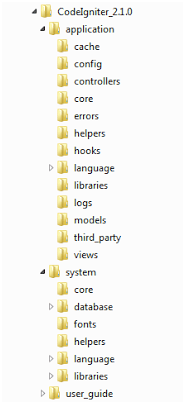
If you download and unzip CodeIgniter, you get the following file structure/folder structure:
Application
- cache
- Config
- Controllers
- core
- errors
- helpers
- hooks
- language
- libraries
- logs
- models
- third-party
- views
system
- core
- database
- fonts
- helpers
- language
- libraries
4) Explain CodeIgniter architecture.
From a technical point of view, CodeIgniter is dynamically instantiation (light-weighted), loosely coupled (components rely very less on each other) and has a component singularity (each class and functions are narrowly focused towards their purpose).
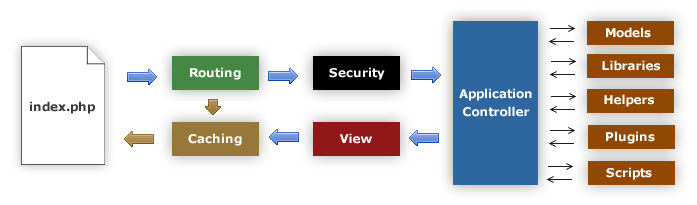
Data flow in CodeIgniter
5) Explain MVC in CodeIgniter.
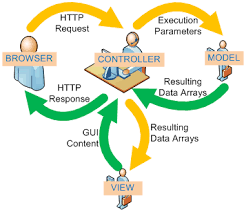
CodeIgniter framework is based on MVC pattern. MVC is a software that gives you a separate logical view from the presentation view. Due to this, a web page contains minimal scripting.
- Model – The Controller manages models. It represents your data structure. Model classes contain functions through which you can insert, retrieve or update information in your database.
- View – View is the information that is presented in front of users. It can be a web page or parts the page like header and footer.
- Controllers – Controller is the intermediary between models and view to process HTTP request and generates a web page. All the requests received by the controller are passed on to models and view to process the information.
6) Explain model in CodeIgniter.
Model’s responsibility is to handle all data logic and representation and load data in the views. It is stored in application/models folder.
The basic structure of a model file
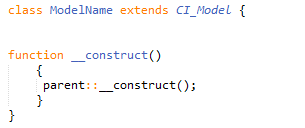
Here, ModelName is the name of your model file. Remember, the class first letter must be in an uppercase letter followed by other lowercase letters, and it should be the same as your file name. It extends the base CodeIgniter Model so that all the built-in methods of parent Model file gets inherited to the newly created file.
7) How can you add or load a model in CodeIgniter?
To load models in controller functions, use the following function:
- $this->load->model(‘ModelName’);
If in case your model file is located in sub-directory of the model folder, then you have to mention the full path. For example, if your file location is application/controller/models/project/ModelName. Then, your file will be loaded as shown below,
- $this->load->model(‘project/ModelName’);
8) How can you connect models to a database manually?
To connect database manually use following syntax,
- $this->load->database();
9) Explain views in CodeIgniter.
View folder contains all the markup files like header, footer, sidebar, etc. They can be reused by embedding them anywhere in controller file. They can’t call directly, and they have to be loaded in the controller’s file.
View syntax
Create a file and save it in application/views folder. For example, we have created a file Firstview.php,
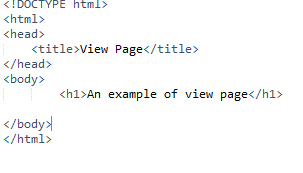
10) How can you load a view in CodeIgniter?
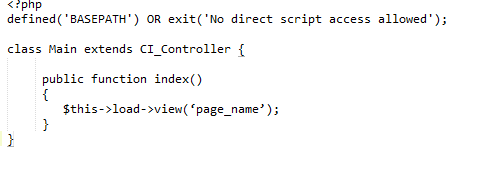
The View can’t be accessed directly. It is always loaded in the controller file. Following function is used to load a view page:
- $this->load->view(‘page_name’);
Write your view’s page name in the bracket. You don’t need to specify .php unless you are using some other extension.
Now, go to your controller file (Main.php) and write this code as shown below.
11) Explain controller in CodeIgniter.
A controller is the intermediary between models and views to process the HTTP request and generates a web page. It is the center of every request on your web application.
Consider following URI,
- abc.com/index.php/front/
In this URI, CodeIgniter try to find Front.php file and Front class.
Controller Syntax
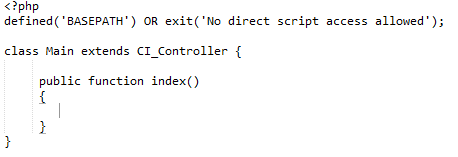
Look at the above snapshot, controller’s file name is Main.php (the first letter has to be in uppercase), and the class name is Main (the first letter has to be in uppercase).
12) What is the default controller in CodeIgniter?
The file specified in the default controller loaded by default when no file name is mentioned in the URL. By default, it is welcome.php which is the first page to be seen after installing CodeIgniter.
With URL
- localhost/codeigniter/
Welcome.php will be loaded as there is no file name mentioned in the URL.
Although as per your need, you can change the default controller in the file application/config/routes.php.
- $route[‘default_controller’] = ‘ ‘;
Here, specify your file name which you want to be loaded by default.
13) How will you call a constructor in CodeIgniter?
To use a constructor, you need to mention the following line of code,
- parent::_construct()
14) What is the basic CodeIgniter URL structure?
Instead of using ‘query-string’ approach, it uses a segment based approach.
Its structure is as follows,
- abc.com/class/function/ID
The class represents a controller class that needs to be invoked.
The function is the method that is called.
ID is an additional segment that is passed to controllers.
15) What is an inhibitor of CodeIgniter?
In CodeIgniter, Inhibitor is an error handler class that uses native PHP functions like set_exception_handler, set_error_handler, register_shutdown_function to handle parse errors, exceptions, and fatal errors.
16) What is the default method name in CodeIgniter?
By default controller always calls index method. If you want to call a different method, then write it in the controller?s file and specify its name while calling the function.
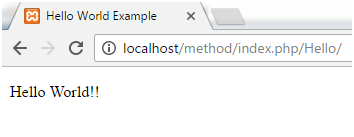
Look at the URL. There is no method name is mentioned. Hence, by default index method is loaded.
17) Explain the remapping method calls in CodeIgniter.
The Second segment of URI determines which method is being called. If you want to override it, you can use _remap() method. The _remap method always get called even if URI is different. It overrides the URI. For Example:
- public function _remap($methodName)
- {
- if ($methodName === ‘a_method’)
- {
- $this->method();
- }
- else
- {
- $this->defaultMethod();
- }
- }
18) What is a helper in CodeIgniter? How can a helper file be loaded?
Helpers are the group of functions that are used to assist the user to perform specific tasks.
URL Helpers: used to create the links.
Text Helpers: used for text formatting.
Cookies Helpers: used for reading and setting cookies.
19) How can you load multiple helper files?
To load multiple helper files, specify them in an array,
- $this->load->helper(
- array(‘helper1’, ‘helper2’, ‘helper3’)
- );
20) Explain the CodeIgniter library. How will you load it?
CodeIgniter provides a rich set of libraries. It is an essential part of CodeIgniter as it increases the developing speed of an application. It is located in the system/library.
It can be loaded as follows,
- $this->load->library(‘class_name’);
21) How can you create a library in CodeIgniter?
There are three methods to create a library,
- Creating an entirely new library
- Extending native libraries
- Replacing native libraries
22) Where is a newly created library stored in CodeIgniter structure?
It should be placed in application/libraries folder.
23) Can you extend native libraries in CodeIgniter?
Yes, we can add some extended functionality to a native library by adding one or two methods. It replaces the entire library with your version. So it is better to extend the class. Extending and replacing is almost identical with only following exceptions.
- The class declaration must extend the parent class.
- New class name and filename must be prefixed with MY_.
For example, to extend it to native Calendar, create a file MY_Calendar.php in application/libraries folder. Your class declared as class MY_Calendar extends CI_Calendar}
24) How can you extend a class in CodeIgniter?
You have to build a file name application/core/MY_Input.php and declare your class with Class MY_Input extends CI_Input {}to extend the native input class in CodeIgniter.
25) What is routing in CodeIgniter?
Routing is a technique by which you can define your URLs according to the requirement instead of using the predefined URLs. Routes can be classified in two ways, either using Wildcards or Regular Expressions.
Wildcards
There are two types of wildcards:
- :num−series containing only numbers matched.
- :any−series containing only characters matched.
Regular Expression
Regular expressions are also used to redirect routes.
- $route[‘blog’(a-zA-Z0-9]+)‘] = ‘women/social’;
You can create your regular expression to run your URL.
26) Why is URL routes need to be configured?
There are many purposes for which the URL routes are configured.
- To improve the number of page visits.
- To hide the code complexities from the user.
27) What are the hooks in CodeIgniter?
The Hook is a feature in CodeIgniter that provides a way to change the inner working of the framework without hacking the core files. It facilitates you to execute a script with a particular path within the CodeIgniter. Usually, it is defined in the application/config/hooks.php file.
28) How to enable CodeIgniter hook?
To enable hook, go to application/config/config.php/ file and set it TRUE as shown below,
- $config[‘enable_hooks’] = TRUE;
29) What are different types of hook points in CodeIgniter?
A list of different types of hook points in CodeIgniter:
- post_controller_constructor – It is called immediately after your controller is started but before any method call.
- pre_controller – It is called immediately before your controller being called. At this point, all the classes, security checks, and routing have been done.
- post_sytem – It is called after the final page is sent to the browser at the end of the system execution.
- pre_system – It is called much before the system execution. Only benchmark and hook class have been loaded at this point.
- cache_override – It enables you to call your function in the output class.
- display_override – It is used to send the final page at the end of file execution.
- post_controller – It is called immediately after your controller is entirely executed.
30) What are CodeIgniter drivers?
These are a particular type of library that has a parent class and many child classes. These child classes have access to the parent class, but not to their siblings. Drivers are found in system/libraries folder.
31) How to initialize a driver in CodeIgniter?
To initialize a driver, write the following syntax,
- $this->load->driver(‘class_name’);
Here, class_name is the driver name.
32) How to create a driver in CodeIgniter?
There are three steps to create a driver:
- Making file structure
- Making driver list
- Making driver(s)
33) How to connect multiple databases in CodeIgniter?
To connect more than one database simultaneously, do the following,
- $db1 = $this->load->database(‘group_one’, TRUE);
- $db1 = $this->load->database(‘group_two’, TRUE);
34) How can you print SQL statement in CodeIgniter model?
- $this>db>insertid();
35) What are CodeIgniter security methods?
CodeIgniter security methods help to create a secure application and process input data. The methods are given below:
- XSS filtering
- CSRF (Cross-site Request Forgery)
- Class reference
36) What are the XSS security parameters?
XSS stands for cross-site scripting. Codeigniter contains a cross-site scripting hack prevention filter. The XSS filter targets methods to trigger JavaScript or other types of suspicious code. If it detects anything, it converts the data to character entities.
XSS filtering uses xss_clean() method to filer data.
- $data = $this->security->xss_clean($data);
There is an optional second parameter, is_image, which is used to test images for XSS attacks. When this parameter is set to TRUE, it doesn’t return an altered string. Instead, it returns TRUE if an image is safe and FALSE if it contains malicious information.
- if ($this->security->xss_clean($file, TRUE) === FALSE)
- {
- //file failed in xss test
- }
37) How can the CodeIgniter be prevented from CSRF?
There are the various ways by which, we can prevent CodeIgniter from CSRF. The most used method is using the hidden field in each page of the website. The hidden field is stored in the user’s session. The filed is changed with every HTTP request. The user can be detected in its every request to the website. The hidden value is always compared with the one saved in the session. If it is the same, the request is valid.
38) How can you enable CSRF?
You can enable protection by editing config.php file and setting it to
To enable CSRF make the following statement TRUE from FALSE in application/config/config.php file.
- $config[‘csrf_protection’] = TRUE;
39) What is CSRF attack in CodeIgniter?
A CSRF attack forces a logged-on victim’s browser to send a forged HTTP request, including victim’s session cookie and other authentication information, to a web application.
For example, suppose you have a site with a form. An attacker could create a bogus form on his site. This form could contain hidden inputs and malicious data. This form is not sent to the attacker’s site, in fact, it comes to your site. Thinking that the form is genuine, your site process it.
Now suppose that the attacker’s form point towards the deletion form in your site. If a user is logged in and redirected to the attacker’s site and then perform the search, his account will be deleted without knowing him. That is the CSRF attack.
40) What is a token method in a CSRF attack?
To protect from CSRF, we need to connect both HTTP requests, form request and form submission. There are several ways to do this, but in CodeIgniter hidden field is used which is called the CSRF token. The CSRF token is a random value that changes with every HTTP request sent.
With each request, a new CSRF token is generated. When an object is created, name and value of the token are set.
- $this->csrf_cookie_name = $this->csrf_token_name;
- $this->_csrf_set_hash();
The function for it is,
- function _csrf_set_hash()
- {
- if ($this->csrf_hash == ”)
- {
- if ( isset($_COOKIE[$this->csrf_cookie_name] ) AND
- $_COOKIE[$this->csrf_cookie_name] != ” )
- {
- $this->csrf_hash = $_COOKIE[$this->csrf_cookie_name];
- } else {
- $this->csrf_hash = md5(uniqid(rand(), TRUE));
- }
- }
- return $this->csrf_hash;
- }
CodeIgniter Interview Questions and Answers

What is CodeIgniter?
CodeIgniter is easy to use an open-source MVC based framework for PHP. It is a loosely coupled framework that is used for the rapid development of websites and mobile APIs.Here you can read about CodeIgniter helpers, sessions, hooks, Routing, Constants ORM supported by Codeigniter and more.
Quick Questions About CodeIgniter
| CodeIgniter is written In | PHP Programming Language |
| CodeIgniter is a | Open Source Loosely Coupled MVC Framework |
| CodeIgniter is developed By | BCIT Recreation Services |
| CodeIgniter is based on | MVC architectural pattern |
| CodeIgniter Dependencies | Php 5.6+,MYSQL 5.1+,PDO Driver |
| CodeIgniter Licence | MIT License |
| CodeIgniter Current Stable release | 4.1.1 |
DOWNLOAD CODEIGNITER INTERVIEW QUESTIONS PDF
Below are the list of Best CodeIgniter Interview Questions and Answers
1) Explain what is Codeigniter?
CodeIgniter is a powerful MVC based PHP framework with a very small footprint, built for developers who need a simple and elegant toolkit to create full-featured web applications.

2) What is the current version of Codeigniter?
As on Sept 19, 2019 CodeIgniter 3.1.11 is the latest version of the framework. You can download it from here
3) How to check the version of CodeIgniter framework?
In system/core/CodeIgniter.php, check CI_VERSION constant value define(‘CI_VERSION’, ‘3.0.6’);
4) List Databases supported By Codeigniter Frameworks?
Following Databases supported are supported by Codeigniter Frameworks
- MySQL (5.1+) via the MySQL (deprecated), MYSQLI and PDO drivers
- Oracle via the oci8 and PDO drivers
- PostgreSQL via the Postgre and PDO drivers
- MS SQL via the MsSQL, Sqlsrv (version 2005 and above only) and PDO drivers
- SQLite via the SQLite (version 2), sqlite3 (version 3) and PDO drivers
- CUBRID via the Cubridand PDO drivers
- Interbase/Firebird via the iBase and PDO drivers
- ODBC via the ODBC and PDO drivers (you should know that ODBC is actually an abstraction layer)
5) List some features provided by CodeIgniter?
- Framework with a small footprint
- Simple solutions over complexity
- Clear documentation
- Exceptional performance
- Strong Security
- Nearly zero configuration
6) Explain helpers in CodeIgniter and how to load helper file?
As the name suggests, helpers help you with tasks.Each helper file is simply a collection of functions in a particular category.They are simple, procedural functions.Each helper function performs one specific task, with no dependence on other functions.
CodeIgniter does not load Helper Files by default, so the first step in using a Helper is to load it. Once loaded, it becomes globally available in your controller and views.
Helpers are typically stored in your system/helpers, or application/helpers directory
Loading a helper file is quite simple using the following method:
$this->load->helper('name');
Where name is the file name of the helper, without the .php file extension or the “helper” part.
Read More
7) Explain routing in CodeIgniter?
In Software engineering routing is the process of taking a URI endpoint (that part of the URI which comes after the base URL) and decomposing it into parameters to determine which module, controller, and action of that controller should receive the request.In Codeigniter typically there is a one-to-one relationship between a URL string and its corresponding controller class/method.The segments in a URI normally follow this pattern:example.com/class/function/id/.In CodeIgniter, all routing rules are defined in your application/config/routes.php file.
8) What are hooks in CodeIgniter? List them?
CodeIgniter’s Hooks feature provides a way to modify the inner workings or functionality of the framework without hacking the core files.
The following is a list of available hook points.
- pre_system Called very early during system execution.
- pre_controller Called immediately prior to any of your controllers being called.
- post_controller_constructor Called immediately after your controller is instantiated, but prior to any method calls happening.
- post_controller Called immediately after your controller is fully executed.
- display_override Overrides the _display() method.
- cache_override Enables you to call your own method instead of the _display_cache() method in the Output Library. This permits you to use your own cache display mechanism.
- post_system Called after the final rendered page is sent to the browser, at the end of system execution after the finalized data is sent to the browser.
9) List Common Functions in Codeigniter?
CodeIgniter uses a few functions for its operation that are globally defined, and are available to you at any point. These do not require loading any libraries or helpers.
- is_php($version)
- is_really_writable($file)
- config_item($key)
- set_status_header($code[, $text = ”])
- remove_invisible_characters($str[, $url_encoded = TRUE])
- html_escape($var)
- get_mimes()
- is_https()
- is_cli()
Read Best 80+AngularJS Interview Questions
10) How do you set default timezone in Codeigniter ?
To set default timezone in Codeigniter open application/config.php file and add below code in it.
date_default_timezone_set('your timezone');
11) How to add / link an images/CSS/JavaScript from a view in CI?
In Codeigniter, you can link images/CSS/JavaScript by using the absolute path to your resources.
Something like below
// References your $config['base_url']
<img src="<?php echo site_url('images/myimage.jpg'); ?>" />
12) What is inhibitor are Codeigniter?
An inhibitor is an error handling class in Codeigniter. It uses PHP ‘s native functions like register_shutdown_function , set_exception_handler, set_error_handler to handle parse errors, exceptions, and fatal errors.
13) How can you remove index.php from URL in Codeigniter?
Follow below steps to index.php from URL in Codeigniter
- Step 1: Open config.php and replaces
$config['index_page'] = "index.php" to $config['index_page'] = ""
and
$config['uri_protocol'] ="AUTO" to $config['uri_protocol'] = "REQUEST_URI"
- Step 2: Change your .htaccess file to
RewriteEngine on
RewriteCond $1 !^(index\.php|[Javascript / CSS / Image root Folder name(s)]|robots\.txt)
RewriteRule ^(.*)$ /index.php/$1 [L]
14) How will you add or load a model in Codeigniter?
In Codeigniter, models will typically be loaded and called from within your controller methods. To load a model you will use the following method:
$this->load->model('model_name');
If your model is located in a sub-directory, include the relative path from your model’s directory. For example, if you have a model located at application/models/blog/Posts.php you’ll load it using:
$this->load->model('blog/Posts');
Once your Model loaded, you will access its methods using an object with the same name as your controller:
Example
class Blog_controller extends CI_Controller {
        public function blog()
        {
                $this->load->model('blog');

                $data['query'] = $this->blog->get_last_ten_entries();

                $this->load->view('blog', $data);
        }
}
15) What are Sessions In CodeIgniter? How to read, write or remove session in CodeIgniter?
Sessions in CodeIgniter
In CodeIgniter Session class allows you maintain a user’s “state” and track their activity while they are browsing your website.
In order to use session, you need to load Session class in your controller.
$this->load->library(‘session’); method is used to sessions in CodeIgniter
$this->load->library('session');
Once loaded, the Sessions library object will be available using:
$this->session
Reading session data in CodeIgniter
Use $this->session->userdata(); method of session class to read session data in CodeIgniter.
Usage
$this->session->userdata('your_key');
You can also read a session data by using the magic getter of CodeIgniter Session Class
Usage
$this->session->item
Where an item is the name of the key you want to retrieve.
Creating a session in CodeIgniter
Session’s Class set_userdata() method is used to create a session in CodeIgniter. This method takes an associative array containing your data that you want to add in session.
Example
$newdata = array(
        'username'  => 'johndoe',
        'email'     => 'johndoe@some-site.com',
        'logged_in' => TRUE
);
$this->session->set_userdata($newdata);
If you want to add userdata one value at a time, set_userdata() also supports this syntax:
$this->session->set_userdata('some_name', 'some_value');
Removing Session Data
Session’s Class unset_userdata() method is used to remove a session data in CodeIgniter. Below are example usages of same.
Unset particular key
$this->session->unset_userdata('some_key');
Unset an array of item keys
 $array_items = array('username', 'email');
 $this->session->unset_userdata($array_items);
Read More https://www.codeigniter.com/userguide3/libraries/sessions.html
16) How to get last inserted id in CodeIgniter?
CodeIgniter DB Class insert_id() method is used to get last insert id.
Usage:
function add_post($post_data){
   $this->db->insert('posts', $post_data);
   $insert_id = $this->db->insert_id();
   return  $insert_id;
}
17) How you will use or load CodeIgniter libraries
$this->load->library(‘library_name’); method is used to load a library in CodeIgniter.
Usage:
//Loading Cart library
$this->load->library('cart');
Using Cart library methods
$data = array(
        'id'      => 'sku_9788C',
        'qty'     => 1,
        'price'   => 35.95,
        'name'    => 'T-Shirt',
        'options' => array('Size' => 'L', 'Color' => 'Red')
);

$this->cart->insert($data);
18) What is the CLI? Why we use CLI in Codeigniter?
CLI is a text-based command-line interface for interacting with computers via a set of commands.
In Codeigniter, we can use CLI for
- Run your cronjobs without needing to use wget or curl
- Make your cron-jobs inaccessible from being loaded in the URL by checking the return value of is_cli().
- Make interactive “tasks” that can do things like set permissions, prune cache folders, run backups, etc.
- Helps to integrate Codeigniter with other applications in other languages. For example, a random C++ script could call one command and run code in your models!
19) How to do 301 redirects in CodeIgniter?
We can use redirect helper to do 301 redirects in Codeigniter.
Syntax :
redirect($uri = '', $method = 'auto', $code = NULL)
Parameter:
    $uri (string) – URI string
    $method (string) – Redirect method (‘auto’, ‘location’ or ‘refresh’)
    $code (string) – HTTP Response code (usually 302 or 303)
Return type: void
Sample Usage:-
redirect('/posts/13', 'New location', 301);
20) How to check a field or column exists in a table or not in Codeigniter?
Code for Checking a field or column exists or not in a Codeigniter table.
if ($this->db->field_exists('field_name', 'table_name'))
{
        // some code...
}
21) What is_cli() method does in Codeigniter?
In Codeigniter is_cli() method is used to check request is from the command line or not.
Returns TRUE if the application is run through the command line and FALSE if not.
22) Explain Codeigniter’s application Flow Chart?
Below images give you an understanding of how data flows throughout the system in Codeigniter.

- The index.php serves as the front controller, initializing the base
resources needed to run CodeIgniter. - The Router examines the HTTP request to determine what should be done
with it. - If a cache file exists, it is sent directly to the browser, bypassing
the normal system execution. - Security. Before the application controller is loaded, the HTTP
request and any user submitted data are filtered for security. - The Controller loads the model, core libraries, helpers, and any
other resources needed to process the specific request. - The finalized View is rendered then sent to the web browser to be
seen. If caching is enabled, the view is cached first so that on
subsequent requests it can be served.
Source: https://www.codeigniter.com/user_guide/overview/appflow.html
23) How to set or get config variables in Codeigniter?
Below is the way to set or get a config variable in Codeigniter
// Setting a config variable dynamically
$this->config->set_item('variable_name', value);
// Getting value of config variable in Codeigniter.
$this->config->item('variable_name');
24) How to delete a record in Codeigniter?
//DELETE FROM table WHERE id = $id
$conditions =['id' => $id]
$this->db->delete('table_name', $conditions);

// Deleting records from more than one tables in one go
$id=1;
$tables = array('table1', 'table2', 'table3');
$this->db->where('id', $id);
$this->db->delete($tables);
25) How to implement validations in Codeigniter?
You can implement form validations in Codeigniter using a form_validation library. Below is simple server-side validation in Codeigniter.
In your Controller
         $this->load->helper(array('form'));
         /* Load form validation library */
         $this->load->library('form_validation');
         /* Set validation rule for name field in the form */
         $this->form_validation->set_rules('firstname', 'FirstName', 'required');

         if ($this->form_validation->run() == FALSE) {
              $this->load->view('myform');
         }
         else {
            $this->load->view('formsuccess');
         }
In your View
<?php echo validation_errors(); ?>
26) What is the default URL pattern used in Codeigniter framework?
abc.com/user/edit/ramesh
The default URL pattern in CodeIgniter consists of 4 main components. They are :
- A server name (abc.com)
- A Controller (user)
- An Action or method (edit)
- An optional action parameter (ramesh)
Prepare 10 Essential Magento Interview Questions
27) How to get random records in MySQL using CodeIgniter?
// Getting random rows from database in CodeIgniter
$this->db->select('*');
$this->db->from('table_name');
$this->db->order_by("column_name", "random");
$result = $this->db->get()->result();
28) Why CodeIgniter is called as loosely based MVC framework?
Codeigniter Is Called a loosely based MVC framework, this is because unlike others the controllers’ classes such as models and views are not mandatory in CodeIgniter. Moreover, one can modify CodeIgniter to utilize HMVC as well.
29) What is an ORM, List ORM’s for CodeIgniter?
- DataMapper
- Doctrine
- Gas ORM
30) Explain URL Helper? Can you list some commonly used URL helpers in Codeigniter?
31) List the resources that can be autoloaded in Codeigniter?
- Classes found in the libraries/ directory
- Helper files found in the helpers/ directory
- Custom config files found in the config/ directory
- Language files found in the system/language/ directory
- Models found in the models/ folder
To autoload resources, open the application/config/autoload.php file and add the item you want loading to the autoload array. You’ll find instructions in that file corresponding to each type of item.
32) In which files routes are defined in Codeigniter?
All Routing rules in Codeigniter are defined in your application/config/routes.php file.
33) In which directory logs are saved in Codeigniter? How to enable error logging in Codeigniter?
By default, all logs in Codeigniter are stored in logs/ directory. To enable error logging you must set the “threshold” for logging in application/config/config.php. Also, your logs/ must be writable.
$config['log_threshold'] = 1;
34) How many types of messages can you log in Codeigniter?
There are three message types in Codeigniter. They are :
- Error Messages. These are actual errors, such as PHP errors or user errors.
- Debug Messages. These are messages that assist in debugging. For example, if a class has been initialized, you could log this as debugging info.
- Informational Messages. These are the lowest priority messages, simply giving information regarding some process.
35) How to set csrf token in codeIgniter?
Csrf is used to set the protection in CodeIgniter. To set csrf, you have to put the corresponding config value True.
Syntax: $config[‘csrf_protection’] = TRUE;
CodeIgniter is an open-source and powerful MVC(Model-View-Controller) based framework used for developing web applications on PHP. CodeIgniter provides libraries for connection with the database and to perform operations such as sending emails, uploading files, managing sessions, etc. It helps for PHP code simplification and brings out a fully interactive, dynamic website in a shorter span of time. The latest version of CodeIgniter is CodeIgniter4 version v4.1.3 which was released on June 6, 2021.
Features of CodeIgniter:
CodeIgniter features will include the following:
- Framework with a small footprint:
Source code for the CodeIgniter framework is nearly 2MB in size. It makes it easier to master CodeIgniter and how it works. In addition, it simplifies deploying and updating it. - Loosely coupled:
The built-in features are designed to work independently without depending too much on any other components. This makes it easier for maintaining and upgrading. - MVC Architecture:
CodeIgniter framework uses the MVC architectural design. MVC architecture separates the data, business logic, and presentation. - Blazing fast:
Users opt for applications that load very fast. If you have worked with few modern frameworks, you will realize that it takes less than one second to load immediately after installation. You can load CodeIgniter on average around less than 50ms. - Excellent and clear documentation:
CodeIgniter framework is having well-maintained documentation. Also, it has good tutorials, books, and answered forum questions on this. This implies whatever challenge you are facing, chances are someone has previously encountered the problem, solved it and the solution is available for you. - Extendable:
CodeIgniter includes several libraries and helpers out of the box. If what you want is not there or you wish to implement an existing feature your way, then you can do so easily by creating your own libraries, packages, helpers, etc. You are also permitted to create REST API in CodeIgniter. - Application-specific built-in components:
It has components for sending email, session management, database management, and much more. - Short learning curve:
CodeIgniter is easy to master for anyone who knows PHP. Within a shorter period, the student can learn CodeIgniter and start professional applications development using CodeIgniter.
Scope of CodeIgniter:
CodeIgniter is a PHP framework with a significantly small footprint, specifically built for developers who want to make use of a simple and graceful toolkit for creating completely featured and functional web applications. This application focus on enabling the users to develop the projects much faster and quicker than if you would have gone for writing your code from scratch. It is used for doing this by providing a set of libraries for the commonly needed applications and tasks.
It provides services for all the application modules to access the application database or external information resources in an OOP manner. Here, the model classes will have the functions that help us to insert, update, and retrieve information in the database.
CodeIgniter Interview Questions for Freshers
1. What is CodeIgniter?
CodeIgniter is an open-source and MVC-based framework used for web application development on PHP. This framework contains libraries, an easier interface with a logical structure to access these libraries, helpers, plug-ins, and other resources as well. It is easy to use compared to other PHP frameworks.
2. What are hooks in CodeIgnitor?
- CodeIgniter’s hooks will provide a way to change the internal workings or framework functionalities without any need for hacking the core files. It permits script execution with a particular path within the CodeIgniter.
- We can globally enable/disable the hooks feature by setting the below-given item in the
application/config/config.phpfile:$config['enable_hooks'] = TRUE; - It is defined in
application/config/hooks.phpfile. For example:
$hook[‘pre_controller’] = array(
‘class’ => ‘MyHookClass’,
‘function’ => ‘Myhookfunction’,
‘filename’ => ‘MyHookClass.php’,
‘filepath’ => ‘hooks’,
‘params’ => array(‘test’, ‘test1’, ‘webs’)
);
In the above code example, the ‘pre_controller‘ hook is called hook point. Various types of hook points are available in CodeIgniter.
3. What is an inhibitor in CodeIgniter?
An inhibitor in CodeIgniter is an error handler class. It will make use of PHP’s native functions like set_error_handler, set_exception_handler, register_shutdown_function to handle parse errors, exceptions, and fatal errors.

4. How to check the CodeIgniter version?
There are 2 ways to check the CodeIgniter version.
- The first method is to run the following code:
<?php
   echo CI_VERSION;
?>
You can echo the constant value of CI_VERSION in the CodeIgniter controller or view file.
- The second method is to navigate to the
system/core/CodeIgniter.phpdirectory which stores the current version number of CodeIgniter in a global constant named ‘CI_VERSION’. Open the file and have a look at the lines:
 /**
  * CodeIgniter Version
  *
  * @var    string
  *
  */
   define('CI_VERSION', '4.1.3');
5. Explain the difference between helper and library in CodeIgniter.
| Helper | Library |
|---|---|
| Helper is a collection of common functions which we can use within Models, Views as well as in Controllers. Once we include the helper file, we can get access to the functions. | Library is a class that has a set of functions that permits for creating an instance of that class by $this->load->library() function. |
| It is not written in object-oriented format. | It is written in an object-oriented format. |
| It can be called in the same manner you call PHP functions. | You must create an object of the class to call library functions by using the $this->library_name->method(). |
All built-in helper file names are suffixed with a word _helper (ex: email_helper.php). |
All built-in library files do not have a specific suffix. |
6. What is routing in CodeIgniter?
- Routing is a technique used in CodeIgniter, by which you can define your URLs based on the requirement instead of using the predefined URLs. So, whenever there is a request made and matches the URL pattern defined by us, it will automatically direct to the specified controller and function.
- A URL string and its corresponding controller class or method are in a one-to-one relationship here. The URI segments usually follow this pattern:
example.com/class/function/id/. All routing rules are defined in theapplication/config/routes.phpfile of CodeIgniter.
7. What are drivers in CodeIgniter?
- A driver is a type of library that has a parent class and multiple child classes. These child classes can access their parent class, but they can’t access their siblings.
- Drivers can be found in the system/libraries folder.
- There are three steps for creating a driver:
- Making file structure
- Making driver list
- Making driver(s)

8. How to link images from a view in CodeIgniter?
In Codeigniter, you can link images/CSS/JavaScript from a view by using the absolute path to the resources required with respect to the root folder as given below:
/css/styles.css
/js/query.php
/img/news/566.gpg
9. Why CodeIgniter is called a loosely based MVC framework?
Codeigniter is called a loosely based MVC framework because it does not need to obey a strict MVC pattern during application creation. It is not important to create a model, we can use only view and controllers for creating an application. In addition, one can modify CodeIgniter to utilize HMVC(Hierarchical Model View Controller) as well.
10. What is a helper in CodeIgniter?
- Helpers are the group of functions that are useful in assisting the user to perform specific tasks.
- There are three types of helper files. They are:
- URL helpers: Used for creating the links.
- Text helpers: Used for the formatting of text.
- Cookies helpers: Used to read and manage cookies.

CodeIgniter Interview Questions for Experienced
11. Explain CodeIgniter Architecture.
- CodeIgniter is mainly designed to deliver high performance in less time within a good environment. For achieving this, each developing process is designed in a simplified manner.
- From the technical point of view, it is dynamically instantiated (libraries are loaded only on request which makes it light-weighted), has loose coupling (components depend very less on each other), and component singularity (each class and its functions are focused only on their purpose).
- Data flow in CodeIgniter: Below image represents that whenever a request is raised from the CodeIgniter application, firstly, it will go to the index.php file.
- index.php is the default file of CodeIgniter. This file initializes the base resources.
- The router determines what should be done with the information.
- If the requested cache file exists, then the information is moved directly to the browser and ignores the further processes.
- If the page requested by the user does not exist in the caching file, the HTTP request and data submitted will be passed under security check.
- The application controller will load the models, libraries, helpers, plugins, and scripts required according to the request.
- A view is used for fetching the data from the application controller that will be represented to the user, and they pass the data to the caching file to the fastest access for future requests.

12. How to load a helper in CodeIgniter?
- You need to load the helper files for using it. Once loaded, it will be globally available to your controller and views. They can be obtained at two places in CodeIgniter. A helper file will be searched by CodeIgniter in the
application/helpersfolder and if it is not available in that folder then it will check in thesystem/helpersfolder. - Helper file can be loaded by adding the following code to the constructor of the controller or inside any function that wants to use:
$this->load->helper('file_name');
Write your file name at the place of file_name. - To load URL helper we can use the code given below:
$this->load->helper('url'); - You are allowed to auto-load a helper if your application needs that helper globally by including it in the
application/config/autoload.phpfile. - Loading multiple helpers is also possible. For doing this, specify them in an array as given below:
$this->load->helper(
   array('helper1', 'helper2', 'helper3')
);
13. What are the advantages of CodeIgniter?
Few advantages of using CodeIgniter is given below:
- Built-in libraries: It comes with various types of default helpers for multiple things including strings, arrays, cookies, directories, file handling, and forms among others.
- Data abstraction: You can make use of the CodeIgniter database abstraction layer for creating, adding, deleting, and replacing statements in a hassle-free manner. This framework allows you to manage multiple connections using a single application.
- Active Developer Community: Bigger the community, the better the help you get. Newly graduated developers look forward to the framework’s forum to get their doubts solved and learn about new things in the process. With so many people actively participating in it from around the world, your doubts will be solved within few hours. And due to the same reason, CodeIgniter documentation is 10 times bigger than any other framework.
- Collaboration with Expression Engine: The collaboration permits developers using CodeIgniter to use libraries and everything else provided by Expression Engine and vice versa. Because of this, developers will get few benefits like better parser class, improved built-in user authentication, and easy access to modular applications.
- Security: The security strength modification can be done according to your client’s needs. These changes are made when the system is initialized by switching off the
magic_quotes_runtimedirective irrespective of theregister_globalsdirective. You don’t need to remove the slashes during information retrieval from the database. You can enable encryption of cookies, where you can handle databases and escape SQL queries directly. - Immigration Features: Database schema update management is easier over different fields by using the migration aspect. It is an easier process to immigrate from the server to the server in Codeigniter.
- Easy to Use: It is easier to use compared to other popular frameworks such as Symfony, Zend framework, and Cake PHP.
14. Give the list of hooks available in CodeIgniter.
The list of available hook points are given below:
pre_system: It is called initially during system execution.pre_controller: It is called immediately before any of the controllers being called. Example:
$hook['pre_controller'] = array(
   'class'    => 'ExampleClass',
   'function' => 'Examplefunction',
   'filename' => 'ExampleClass.php',
   'filepath' => 'hooks',
   'params'   => array('mango', 'apple', 'orange')
);post_controller_constructor: It is called soon after instantiating your controller, but before any occurrence of the method call.post_controller: It is called immediately after the complete execution of the controller.display_override: It overrides the_display()method.cache_override: It enables calling of the user-defined method instead of_display_cache()method which is available in the Output Library. This permits you for using your own cache display mechanism.post_system: It is called soon after the final rendered page has been submitted to the web browser, at the end of system execution when the final data has been sent to the browser.
15. What is Command-Line Interface(CLI)? Why we use CLI in Codeigniter?
Command-Line Interface or CLI is a text-based interface for interacting with computers through a set of commands. We can use CLI in CodeIgniter for:
- Running your cron-jobs without
wgetorcurlusage - Make your cron-jobs inaccessible from being loaded in the URL(Uniform Resource Locator) by checking the value returned by
is_cli() - Make interactive “tasks” that can do various things such as set permissions, run backups, prune cache folders, etc.
- It helps to integrate CodeIgniter with applications in other languages. For example, a random C++ script can call a command and run code in your models.
16. What is meant by a library? How can you load a library in CodeIgniter?
- Libraries are packages created in PHP that give higher-level abstractions and thus contribute to faster development. This removes the necessity of focusing on small, minute details by taking care of those by themselves.
- Three methods are available to create a library:
- Create an entirely new library
- Extend native libraries
- Replace native libraries
- To load a library in CodeIgniter, you have to include the below code inside a controller:
$this->load->library(‘class_name’); - All pre-defined libraries developed by CodeIgniter can be obtained at the
system/librariesdirectory. - For loading multiple libraries at the same time, you can make use of the same code. But replace the parameter with an array for loading multiple libraries.
$this->load->library(array(‘library1’, ‘library2’));17. What is CSRF token in CodeIgniter? How to set CSRF token?
- CSRF(Cross-Site Request Forgery) token is a randomly generated value that gets modified with every HTTP request sent by webform.
- A CSRF attack forces a browser of the logged-on victim for sending a forged HTTP request, including the session cookie of the victim and other information related to authorization, to a web application. A CSRF token is used for setting or activating the protection in CodeIgniter.
- CSRF token is saved in the user’s session when it is added in the website form. When we submit the form, the website compares both submitted tokens and saved tokens in the session. If they are the same, a request is considered valid. When the page gets loaded token value will also be changed each time. Thus it becomes difficult for the hackers to identify the current token.
- To set CSRF, you have to set the corresponding config value as true in your
application/config/config.phpfile.
Syntax :$config['csrf_protection'] = TRUE;
If you use the form helper, the form_open() method will automatically insert a hidden CSRF field in your forms.
18. How to extend the class in CodeIgniter?
You have to create a file with the name Example.php under application/core/ directory and declare your class with the below code:
Class Example extends CI_Input {
     // Write your code here
}
19. What is the difference between Laravel and CodeIgniter?
| Based on | Laravel | CodeIgniter |
|---|---|---|
| Database model | It is object-oriented. | It is relational object-oriented. |
| Built-in module | It comes along with a built-in module. | It does not come with a built-in module. |
| Structure | Follows MVC structure of filing with a command-line tool known as Artisan. | Follows the MVC structure but it provides easier boarding based on object-oriented programming. |
| Development and Template | It is a good option for front-end developers and it comes along with the Blade template engine. | It is easier to use and there is no template engine provided. |
| Utilized by | OctoberCMS, Laracasts | PyroCMS, Expression engine |
| Libraries | Provide their own official documentation which is very helpful. | Provides a lot of built-in functionality |
| Routing | Supports Explicit routing | Supports both Explicit and Implicit routing. |
20. List various databases supported by the CodeIgniter framework.
Following Databases are supported by the CodeIgniter framework:
- MySQL (version 5.1+) database that uses MySQL (deprecated), mysqli, and PDO drivers
- Oracle database that uses oci8 and PDO drivers
- PostgreSQL database that uses Postgre and PDO drivers
- ODBC database that uses ODBC and PDO drivers
- SQLite database that uses SQLite version 2, SQLite3 version 3, along with PDO drivers
- MS SQL database that uses Sqlsrv (version 2005 and above), MsSQL, and PDO drivers
- Interbase/Firebird database that uses iBase and PDO drivers
- CUBRID database that uses Cubridand PDO drivers
21. What is the work of anchor tag in CodeIgniter?
- Anchor tag creates a standard HTML anchor link based on the URL of your local site.
- Syntax:
anchor($uri = '', $title = '', $attributes = '')- Here, $uri represents a URI string, $title represents an anchor title and $attributes represents an HTML attributes. It returns an HTML hyperlink (anchor tag) of string type.
The first parameter can have any segments you would like to append to the URL. These segments can be a string or an array.
The second parameter is the text that will be displayed with a link. The URL will be used in case you leave it blank.
The third parameter can contain an attribute list you would like added to the link. The attributes can be a string or an associative array.
- Example:
echo anchor('details/local/123', 'My Details', 'title="Details title"');
// Prints: <a href="http://example.com/index.php/details/local/123" title="Details title">My Details</a>
22. Explain CodeIgniter E-mail library. How to send an E-mail using CodeIgniter?
- Features of Email Class in CodeIgniter are given below:
- Multiple protocols such as Mail, Sendmail, and SMTP
- TLS and SSL Encryption for SMTP
- CC and BCCs
- Multiple recipients
- Attachments
- HTML or Plain-text email
- Priorities
- Word wrapping
- BCC Batch Mode, enabling larger e-mail lists to be broken into smaller BCC batches
- Email Debugging tools
- Sending Email:
Sending an email is a simple process here. You can configure an email on the fly or set your preferences in theapp/Config/Email.phpfile. A basic example for demonstrating how you might send email is given below:
$email = \Config\Services::email();
$email->setFrom('your@interviewbit.com', 'Your Name');
$email->setTo('someone@interviewbit.com');
$email->setCC('another@another-example.com');
$email->setBCC('them@their-example.com');
$email->setSubject('Email Test');
$email->setMessage('Testing the email class.');
$email->send();
23. How to deal with Error handling in CodeIgniter?
CodeIgniter enables you to develop error reporting into your applications by using the below-given functions. Also, it has a class dedicated to error logging that permits messages related to error and debugging to be saved as text files.
Functions related to error handling are:
- This function will display the error message provided by the
application/errors/errorgeneral.phptemplate.
show_error(‘message’ [, int $statuscode= 500 ] )- This function shows the 404 error message supplied to it by using the
application/errors/error404.phptemplate.
show_404(‘page’ [, ‘logerror’])- This function permits you to write messages onto your log files. You must provide anyone among three “levels” in the first parameter that indicates the message type (debug, error, info), with the message itself in the second parameter.
log_message(‘level’, ‘message’)24. Explain the default URL pattern used in CodeIgniter.
- CodeIgniter will make use of a “segment-based” approach instead of a “query string-based” approach.
- CodeIgniter framework has four main parts in the default URL pattern. First, we have the name of the server, and next, we have the name of the controller class followed by name of the controller function and function parameters at the end. Codeigniter is accessed using the URL helper. The basic URL structure is:
http://servername/controllerName/controllerFunction/parameter1/parameter2/.../parametern- Example:
interviewbit.com/user/edit/sureshHere, interviewbit.com is a server name, a user is a controller class that needs to be invoked, an edit is an action or method, and suresh is an optional action parameter that is passed to controllers.
25. How you can add or load a model in CodeIgniter?
- In CodeIgniter, models are loaded as well as called inside your controller methods. For loading a model, you must use the below-given method:
$this->load->model('name_of_the_model');- Include the relative path from the directory of your model, if your model is placed inside a sub-directory. Consider an example, you have a model which is placed at
application/models/blog/AllPosts.phpyou can load it by using:$this->load->model('blog/AllPosts'); - You can access the methods provided by the model, once the model gets loaded by using an object which has the same name as your controller:
class MyBlogController extends CI_Controller
{
   public function MyblogModel()
   {
           $this->load->model('blog_model');
           $data['que'] = $this->blog_model->get_last_five_entries();
           $this->load->view('blog_model', $data);
   }
}
26. Explain the CodeIgniter framework.
The CodeIgniter application is based on the MVC (Model – View – Controller) model, which separates the application logic from the presentation view. Because of presentation view separation from the PHP scripting, it allows your web pages for script minimization.

- Model:
- Generally, a model is used for database interaction. When a user raises a request for the specific data from the application, the model takes the accountability to fetch out the records from the database table.
- Also, a data structure represented by the model can be used to perform several operations like retrieve, insert, update, and delete.
- Controller:
- The working of the CodeIgniter application is controlled by the controller. It acts as an intermediary for the communication between the model and the view. Therefore, it has the accountability to receive the user request and handle that request by furnishing a result generated by the model. The appropriate records will be displayed to the user by using the view component. (Note: The Controller file name and class name should be the same and must be in uppercase letters. Example- Main.php)
- View:
- Typically, a view is similar to a web page that has the information displayed to the user. A view can also be an integral part of a web page such as header and footer. The view page can be represented in both RSS(RDF Site Summary) and a user interface.
27. How to pass an array from the controller to view in CodeIgniter?
A view is a webpage that shows each element of the user interface. It cannot be called directly, you need to load the views via the controller. You can pass an array from the controller to view in CodeIgniter using below given steps:
- Create a view:
Create a new text file and name it ciblogview.php. Save the created file in the application/views/ directory. Open the ciblogview.php file and add the below-given code to it:
<html>
<head>
   <title>Blog</title>
</head>
<body>
   <h1>Welcome to Blog in CodeIgniter</h1>
</body>
</html>- Load the view:
Loading a view is executed using the following syntax: $this->load->view('name');
Where ‘name’ represents the name of the view.
The below code creates a controller named Blog.php. This controller has the method for loading the view.
<?php
class Blog extends CI_Controller
{
   public function index()
   {
       $this->load->view('ciblogview');
   }
}
?>- Passing an array from the controller to view:
You are allowed to paste the below-given controller code within your controller file or put it in the controller object.
$data['mega_header'][] = (object) array('title' => 'image portfolio' , 'img' => 'https://complete_image_path' );
$this->load->view('multiple_array', $data);
Arrays are displayed as a brick[‘…’] and objects as an arrow(->). You are allowed to access an array with the brick[‘…’] and object using the arrow (->). Therefore, add the below-given code in the view file:
<?php
   if (isset($mega_header)){
       foreach ($mega_header as $key) {
           ?>
           <div class="header_item">
               <img alt="<?php echo($key['title']); ?>" src="<?php echo($key->img); ?>"/>
           </div>
           <?php
       }
   }
?>- Add dynamic data to views:
Usually, data transfer from the controller to view is done through an array or an object. The array or the object is passed as the second parameter of the view load method similar to the below-given method:
$data = array(
   'title' => 'TitleValue',
   'heading' => 'HeadingValue'
);
$this->load->view('ciblogview', $data);
The controller will look like this:
<?php
   class Blog extends CI_Controller {
   public function index()
   {
       $data['title'] = "TitleValue";
       $data['heading'] = "HeadingValue";
       $this->load->view('ciblogview', $data);
   }
}
?>
The view file will look like this:
<html>
<head>
   <title><?php echo $title;?></title>
</head>
<body>
   <h1><?php echo $heading;?></h1>
</body>
</html>
28. Explain how to prevent CodeIgniter from CSRF(Cross Site Request Forgery).
There are many ways to protect CodeIgniter from CSRF, one method of doing this is to use a hidden field in every form on the website. This hidden field is considered as CSRF token, it is a random value that changes with each HTTP request sent. After gets inserted into the website forms, it will be saved in the user’s session as well. So, when the user submits the form, the website checks whether it is the same as the one that was saved in the session. If it is the same then, the request is authorized.
29. What are the sessions in CodeIgniter? How to handle sessions in CodeIgniter?
In CodeIgniter, you are allowed to maintain a user’s “state” by Session class and keep an eye on their activity while they browse your website.
- Loading a session in CodeIgniter:
For using session, your controller should be loaded with your Session class by using the$this->load->library(‘session’);.
Once the Session class is loaded, the Session library object can be obtained using$this->session. - Read session data in CodeIgniter:
$this->session->userdata();method of Session class is used to read or obtain session data in CodeIgniter.
Usage:$this->session->userdata('name_of_user');
Also, the below-given method of the Session class can be used to read session data.
Usage:$this->session->key_item
Where an item represents the key name you want to access. - Create a session in CodeIgniter:
The set_userdata() method that belongs to the Session class is useful in creating a session in CodeIgniter. This method uses an associative array that has the data you want to include in the session.
Adding session data:
Example:
$sessiondata = array(
   'name_of_user'  => 'lekha',
   'email'     => 'lekha@interviewbit.com',
   'log_state' => TRUE
);
$this->session->set_userdata($sessiondata);
If you want to add a single user data at a time, set_userdata() supports this syntax:
$this->session->set_userdata('demo_username', 'demo_value');- Remove session data in CodeIgniter:
The unset_userdata() method that belongs to the Session class is useful for removing session data in CodeIgniter. Usage examples are given below:
Unset particular key:
$this->session->unset_userdata('name_of_user');Unset an array of item keys:
$arr_items = array('name_of_user', 'email');
$this->session->unset_userdata($arr_items);
30. Explain CodeIgniter folder structure.
The CodeIgniter folder structure is given below:
- application: This directory will have your application logic. All of your application codes will be held in this directory. Internal subdirectories in the CodeIgniter directory structure are given below:
- cache – It stores cached files.
- config – It keeps configuration files.
- controller – All application controllers are defined under this controller.
- core – It consists of custom core classes that extend system files. For example, if you create a base controller that other controllers should extend, then you should place it under this directory.
- helpers – This directory will be used for user-defined helper functions.
- hooks – It is used for custom hooks in the CodeIgniter folder structure.
- language – It is used to store language files for applications that use multiple languages.
- libraries – It is used to store custom-created libraries.
- logs – Application log files are placed in this directory.
- models – All application models must be defined under this directory.
- third_party – This is used for custom many packages that are created by you or other developers.
- views – application views will be stored in this directory.
- system: It consists of the framework core files. It is not advised to make any modifications in this directory or put your own application code into this directory. System subdirectories in CodeIgniter are given below:
- core – This is considered to be the heart of the CodeIgniter Framework. All of the core files that construct the framework are located here. If you would like to extend the core file functionality, then you must
- create a custom core file in the application directory. After this, you are allowed to override or add new behavior that you wish. You should never make any changes directly in this directory.
- database – It stores the files such as database drivers, cache, and other files that are needed for database operations.
- fonts – This directory contains fonts and font-related information.
- helpers – This directory consists of helper functions that come out of the box.
- language – It contains language files that are used by the framework
- libraries – It contains the source files for the different libraries that come along with CodeIgniter out of the box.
- user_guide: This directory consists of a user manual for CodeIgniter. You should not upload this directory during application deployment.
- vendor: This directory consists of composer packages source code. The
composer.jsonandcomposer.lockare the other two files related to this directory. - index.php: This is considered as the entry point into the application. It is placed inside the root directory.
31. What is the security parameter for XSS in CodeIgniter?
- Codeigniter has got a Cross-Site Scripting(XSS) hack prevention filter. This filter either automatically runs or you can run it based on item, to filter all data related to POST and COOKIE.
- The XSS filter will target the frequently used methods to trigger JavaScript code or other types of code that attempt to hijack cookies or do any other malicious activity. If it identifies anything suspicious or anything disallowed is encountered, then it will convert the data to character entities.
- To filter data through the XSS filter, we will make use of the xss_clean() method as given below:
$data = $this->security->xss_clean($data);This function is used only when you are submitting data. The second Boolean parameter is optional and used to check the image files for the XSS attacks. This is very useful for file upload. If its value is true, that means the image is safer and not otherwise.
32. What is the default controller in CodeIgniter?
- When the name of the file is not mentioned in the URL then the file will be specified in the default controller that is loaded by default. By default, the file name will be
welcome.php, which is known as the first page to be seen after the installation of CodeIgniter. localhost/codeigniter/In this case, thewelcome.phpwill be generally loaded as the file name is not mentioned in the provided URL. Generally, the programmers can change the default controller that is present in theapplication/config/routes.phpfile as per their needs.$route['default_controller'] = ' ';In the above-given syntax, the programmer has to specify the file name that he/she wants to get loaded as the default one.
33. List all the auto-loadable resources available in CodeIgniter.
- The below-given items can be automatically loaded in CodeIgniter:
- Classes obtained in the directory named
libraries/ - Custom config files obtained in the directory named
config/ - Helper files obtained in the directory named
helpers/ - Models obtained in the directory named
models/ - Language files obtained in the directory named
system/language/
- Classes obtained in the directory named
- For resource autoloading, you should open the file
application/config/autoload.phpand include the item that you want to be get loaded into the array of autoloads. In the file related to each type of item, you can find instructions.
34. What do you mean by the controller in CodeIgniter?
- The mediator present between the model and the view for processing the HTTP request and is used for generating a web page is called a controller. It is considered as the center of each HTTP request that exists on the web application of the user.
- Consider the following URL in this reference:
projectName/index.php/welcome/
In this URL, the CodeIgniter is trying to find thewelcome.phpfile and the Welcome class. - Controller syntax is given below:
class ControllerName extends CI_Controller
{
   public function __construct()
   {
       parent::__construct();
   }
   public function MethodName()
   {
   }
}
35. Why is there a need to configure the URL routes?
Changing the URL routes has many benefits such as:
- From the SEO(Search Engine Optimization) point of the view, to make URL SEO friendly and obtain more user visits.
- Hide some URL elements like controller name, function name, etc. from the users for security purposes.
- Provides different functionality to the specific parts of a system.